Devices
Connect WiFi hydrometers and sensors (iSpindel, Tilt, RAPT Pill, GravityMon, Hydrom, BrewBrain Float, Plaato Airlock or any custom device) so BrewForge logs fermentation readings and keg levels automatically.
A connected device sends its readings to BrewForge on its own: gravity and temperature during fermentation, or the weight or volume of a keg in your cellar. Readings land on the brew or keg you connected the device to, so the fermentation chart, progress, attenuation and ABV update without you lifting a sample.
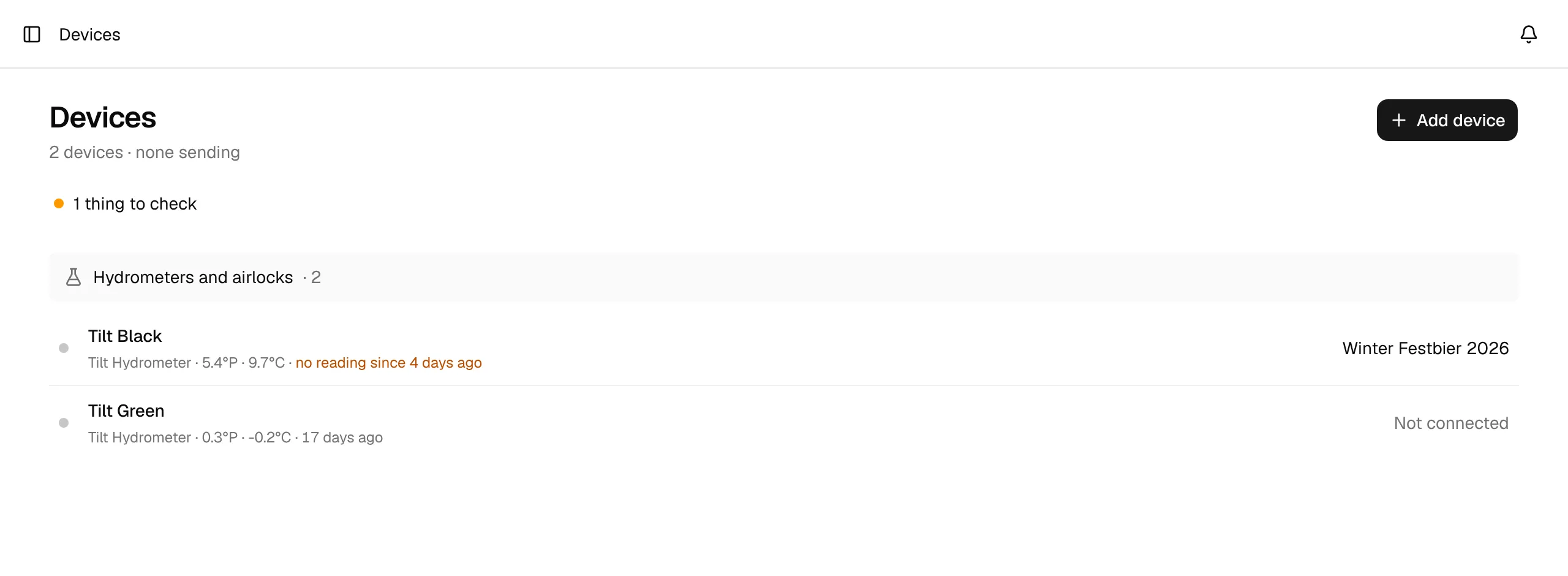
Open Devices in the Setup section of the sidebar (before your first device it waits under More, why). Settings → Integrations → Fermentation devices links to the same page.
The Devices page
Under the title, one line says how many devices you have and how many are sending readings right now. Devices are grouped by hardware:
- One section per Tilt Bridge, with the Tilts it forwards. Open in the section bar opens the bridge itself.
- Hydrometers and airlocks: iSpindel, Tilt, RAPT Pill, Hydrom, GravityMon, BrewBrain Float and Plaato Airlock.
- Keg sensors and custom streams: every Custom Stream device, including keg scales and volume sensors.
Each row shows the device's name, its type, the latest values and when they arrived. On the right you see what it is connected to: a brew, a keg, or Not connected. The dot in front tells you its state:
| Dot | Meaning |
|---|---|
| Green | Online: a reading was logged in the last 30 minutes. |
| Grey | Offline: the last reading is older than 30 minutes. |
| Pulsing amber | Waiting for the first reading: nothing has arrived since you added the device. |
If a connected device hasn't sent a reading for more than a day, the row says no reading since … and a things to check line appears above the list. Click it to see the devices and jump to them.
Click a row to open the device page, where you see its readings, connect it, set it up and change its settings. With no devices yet, the page explains what you can connect and offers Add device.
Supported devices
| Device | How it connects | Setup guide |
|---|---|---|
| iSpindel | HTTP push from the iSpindel's configuration portal | iSpindel |
| Tilt Hydrometer | Custom URL webhook in TiltBridge or TiltPi, one Tilt | Tilt |
| Tilt Bridge | Same webhook, any number of Tilt colors | Tilt |
| RAPT Pill | Stream (or custom webhook) in the RAPT Portal | RAPT Pill |
| GravityMon | HTTP Post push in GravityMon's web UI | GravityMon |
| Hydrom | HTTP client service (iSpindel protocol) | Hydrom |
| BrewBrain Float | BrewForge integration in BrewBrain (not working yet) | BrewBrain Float |
| Plaato Airlock | Brewfather integration of a community server running open-plaato-keg; bubbles per minute, no gravity | Plaato Airlock |
| Custom Stream | Any device or script that can send an HTTP request, including keg scales | Custom Stream |
Devices are available on every plan, including Free. Keg scales and volume sensors write to kegs in the cellar, which is part of the Pro plan.
How it works
Add the device in BrewForge. You get a personal webhook URL for it (Add a device).
Paste the URL into your device (or its bridge or cloud service). From then on it sends a reading every few minutes.
Connect the device to a brew (or a keg). Every reading with a gravity value (or, from an airlock, bubbles per minute) becomes a fermentation reading of that brew (Fermentation tracking).
What BrewForge does with a reading
- Converts units. Plato is converted to specific gravity and Fahrenheit to Celsius, so every device ends up on the same scale (how).
- Applies your calibration. The device's gravity offset is added to every gravity reading.
- Checks plausibility. For the built-in device types, gravity outside 0.800–1.200 SG and temperatures outside −50 to 100 °C are dropped as sensor errors.
- Stores at most one reading every 14 minutes per device. If a device sends more often, BrewForge still updates the latest values on the device page but doesn't store every reading, which keeps charts readable and fast.
- Adds it to the connected brew. Gravity, temperature, pH, pressure and bubbles per minute go into the brew's fermentation readings. A keg sensor updates the litres left in its keg instead.
Brews over the free plan's limit
On the free plan, brews beyond the 20-brew limit are locked and don't receive device readings. The device keeps storing them, so nothing is lost if you upgrade or free up space.