Custom Stream devices
Connect any sensor, script or home automation to BrewForge by mapping the fields of your own JSON, query parameter or form payload to gravity, temperature, pH, pressure, weight or volume.
A Custom Stream device accepts whatever your device sends. You tell BrewForge where in the payload each value is and in which unit, and it turns every request into a reading. Use it for DIY sensors, pressure transducers, pH probes, keg scales, Home Assistant, Node-RED, or a script on a Raspberry Pi.
Set up the mapping
Add a device, choose Custom Stream and click Next. The second step is Name & mapping.
Enter a Name and choose what Your device sends:
| Format | Your device sends |
|---|---|
| JSON | a JSON body, for example {"data": {"sg": 1.048, "temp": 19.5}} |
| Query parameters | the values in the URL, for example …/webhook?key=…&sg=1.048&temp=19.5 (no body needed) |
| Form | a form body, for example sg=1.048&temp=19.5 |
Click Add field for each value. In the field dialog:
- Path in the payload: where the value is. Nested JSON uses dots, for example
data.gravity; for query parameters and forms it's the parameter name. - Saved as: the BrewForge field it becomes. The hint below says the unit it is stored in.
- Device sends it in: the unit your device uses, for fields that have units.
Save adds the field to the list. Click a field in the list to change it, or to Remove it.
Open Try a sample payload, paste what your device sends and click Check. BrewForge shows each mapped field with the value it reads (and the value sent, if it converted it), keys in the payload you haven't mapped (not mapped), and values that aren't numbers. Nothing is stored.
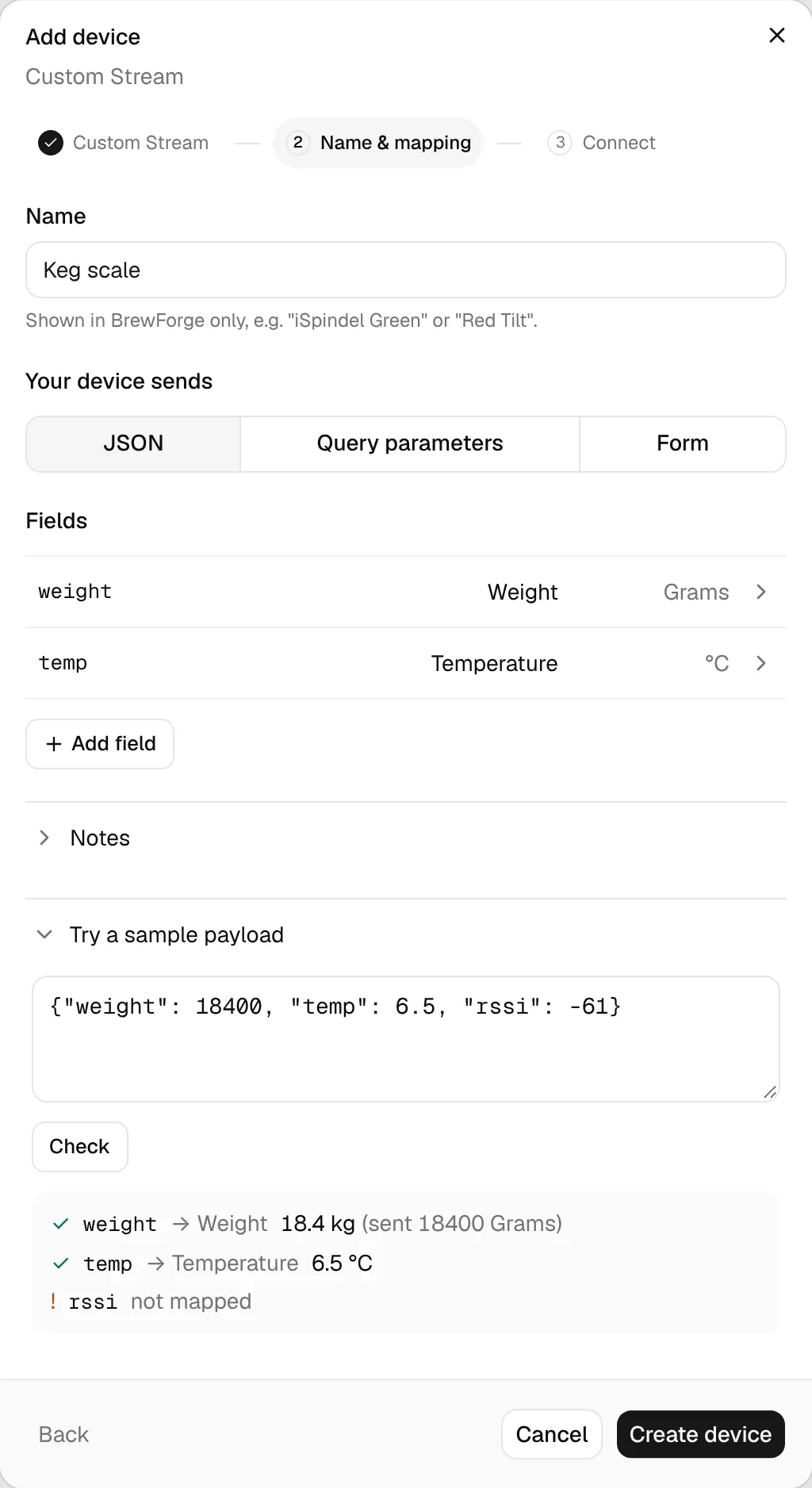
Optionally add Notes, for example the firmware version. Click Create device (it needs at least one field with a path) and send your readings to the webhook URL.
Change the mapping later on the device page under Settings → Payload mapping or ⋯ → Payload mapping…. Changes apply to payloads that arrive afterwards.
Fields and units
| BrewForge field | Units you can map from | Stored as |
|---|---|---|
| Gravity | SG, Plato, Brix | SG |
| Temperature | °C, °F, K | °C |
| Pressure | PSI, Bar, kPa | PSI |
| Weight | kg, Grams, Ounces, Pounds | kg |
| Volume | Litres, mL, Gallons | litres |
| Bubbles per minute | as sent | bpm |
| Gravity velocity (points per day) | as sent | SG points per day, negative while dropping |
| pH, Battery, Angle, RSSI | as sent | as sent |
| Timestamp (Unix seconds) | Unix seconds | time of the reading |
| Ignore | not stored |
If the unit is part of the payload (for example "unit": "F"), choose From payload under Device sends it in and give the Path of the unit field. BrewForge understands the usual spellings (F, C, K, P, B, bar, kPa, psi, g, kg, oz, lb, ml, L, gal).
The conversion formulas are listed in Calibration and calculations.
Send readings
Send each reading as a POST (or PUT) to the webhook URL. For example with curl:
curl -X POST "https://brewforge.sh/api/devices/webhook?key=YOUR_DEVICE_KEY" \
  -H "Content-Type: application/json" \
  -d '{"data": {"sg": 1.048, "temp": 19.5}}'
The response tells you what BrewForge did with it:
{
  "success": true,
  "device": "Keg scale",
  "logged": true,
  "parsed": { "…": { "sourcePath": "data.sg", "rawValue": 1.048, "convertedValue": 1.048 } },
  "errors": []
}
"logged": false with "reason": "rate_limit" means the reading arrived less than 14 minutes after the last stored one; the device's latest values were still updated.
Readings with their own time
By default a reading is stored with the time it arrived. To store the time it was measured (for example when a logger uploads a backlog), map a payload field to Timestamp (Unix seconds) or append ×tamp=<Unix seconds> to the webhook URL.
Test from BrewForge
On the device page, Send test (in Recent data) or ⋯ → Send a test payload… posts a payload of your own to the device's webhook, exactly like a real reading. The dialog shows the webhook's Response, and the reading appears at the top of Recent data. If the device is connected, the test reading goes into that brew or keg, so use realistic values or disconnect first.
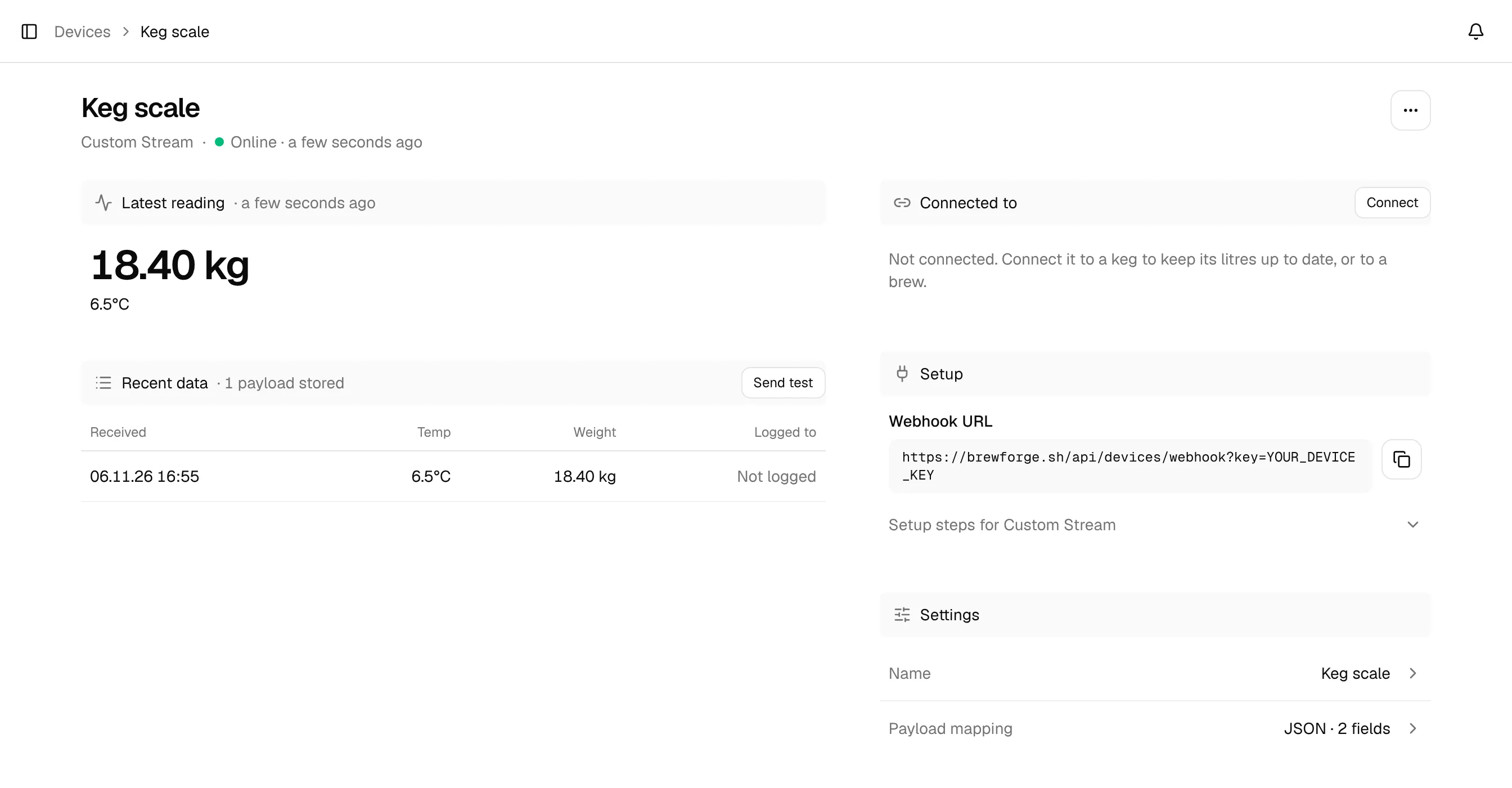
Click any row in Recent data to see the Payload as received and How it was read, so you can see exactly why a value was or wasn't picked up. Payloads that matched none of your fields are marked Nothing matched, and the page shows how many recent payloads that happened to.
What happens with the values
- With gravity in the reading and the device connected to a brew, the reading is added to the brew, together with temperature, pH and pressure.
- With Bubbles per minute (an airlock counter), the reading is added to the connected brew even without gravity, and the brew's chart shows a Bubbles/min layer.
- With Gravity velocity (a device that calculates its own speed), the brew shows that value as its fermentation speed instead of calculating one. It only comes with a reading that has a gravity.
- With weight or volume mapped, the device can measure a keg instead: see Keg sensors.
Keep the key secret
Anyone with the webhook URL can send readings to the device. Keep it out of public repositories and shared screenshots, or send the key as an Authorization: Bearer header from a secret store.