Your first recipe
Create a brew, pick equipment and style, add fermentables, hops, yeast, mash and fermentation steps, and read BrewForge's live gravity, bitterness, color and ABV calculations.
Create a brew
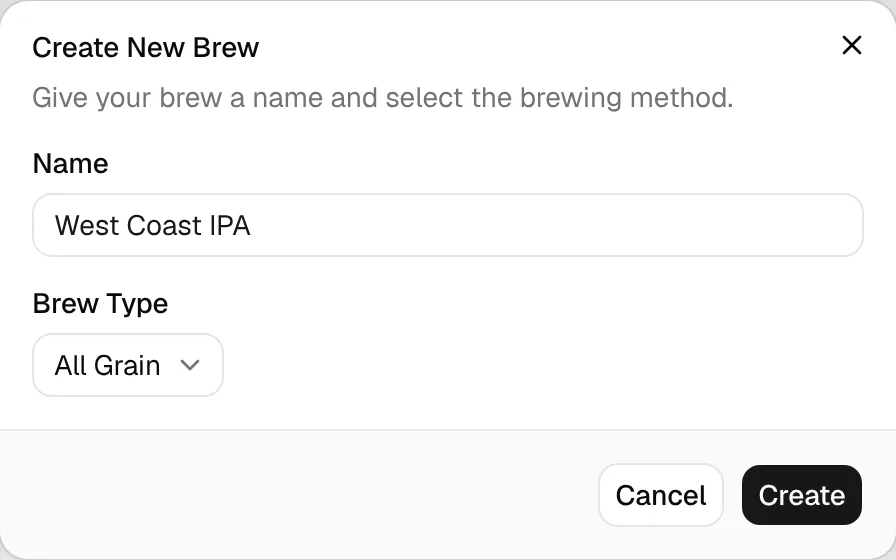
On the Brews page, click New Brew, give it a name and pick the brew type (All Grain, Partial Mash or Extract). The brew opens straight away on its Recipe tab and starts as an Idea.
Other ways to start
You can also import a BeerXML or MMuM file with ⋯ → Import BeerXML next to New Brew, bring in your Brewfather history with the Brewfather import, or copy an existing brew with ⋯ → Duplicate Brew to brew it again or start a new version of the recipe.
The brew page
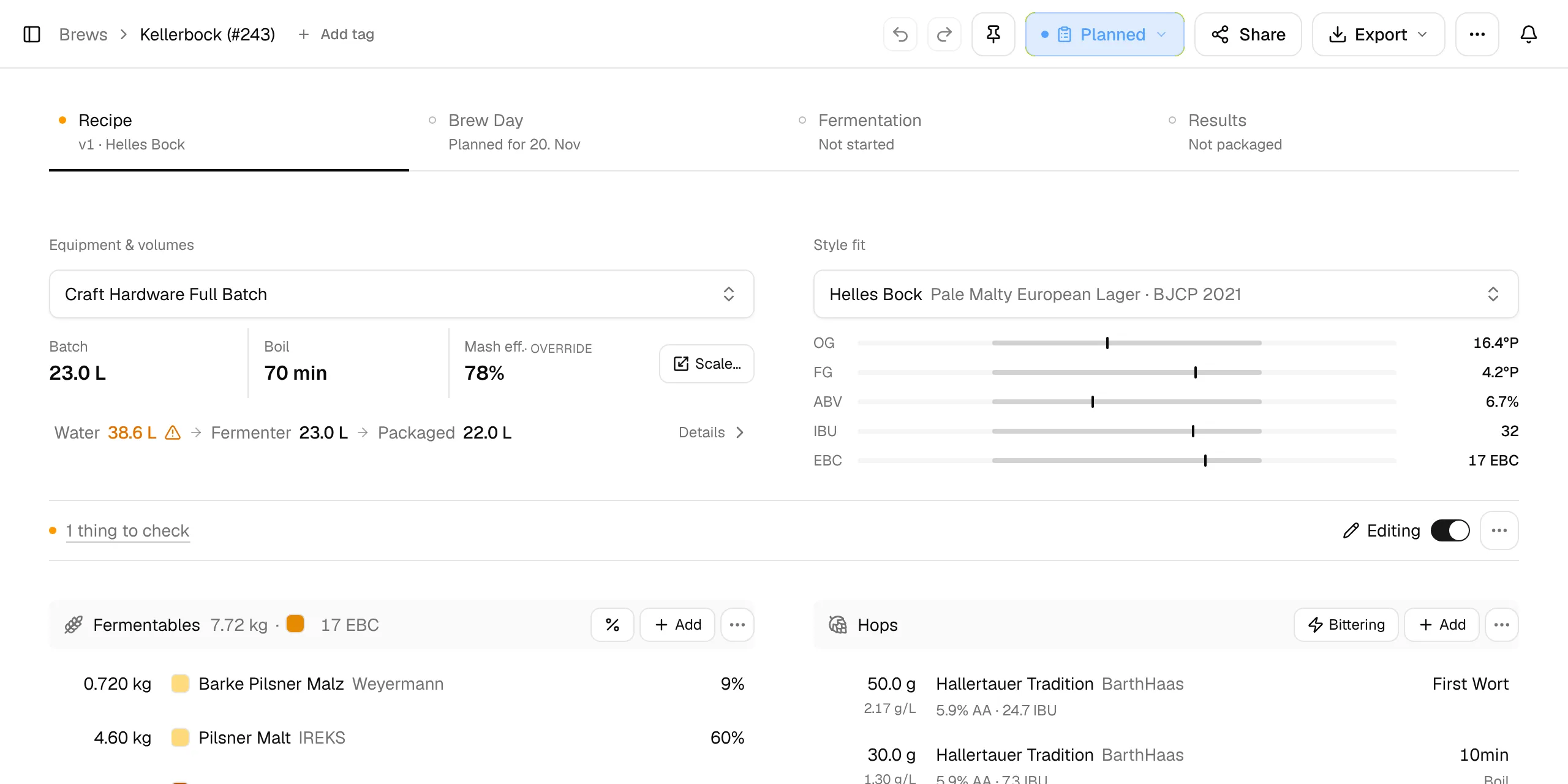
The brew page has four tabs that follow the beer: Recipe, Brew Day, Fermentation and Results. The line under each tab tells you where that phase stands, for example Planned for 20. Nov under Brew Day. The status button in the header (here Planned) shows the brew's stage; most status changes happen on their own as you work through the tabs.
The Recipe tab reads like a recipe sheet. Each section shows its ingredients or steps and, in a line at the bottom, its result. Click that line for more numbers, click a row to change it, and look in a section's ⋯ menu for the less common tools. Changes save automatically, and Undo and Redo sit in the header.
See Brews for the whole page and Recipe tab for every option.
Equipment and style
The top of the tab holds the two choices that shape everything else:
- Equipment & volumes: pick your equipment profile. It sets the Batch size, Boil time and Mash eff. Click the three values to change them for this recipe only (they're marked override), or use Scale… to scale the whole recipe to a new batch size. The line Water → Fermenter → Packaged shows the volumes; Details explains every loss in between.
- Style fit: pick a style. Five bars compare your OG, FG, ABV, IBU and color with the style's range. A value turns amber just outside the range and red further out.
Below, Things to check lists anything that needs a look, such as an IBU above the style or a mash tun that overflows. Click it to jump to the fix. When all is well it says Nothing to check.
Add ingredients
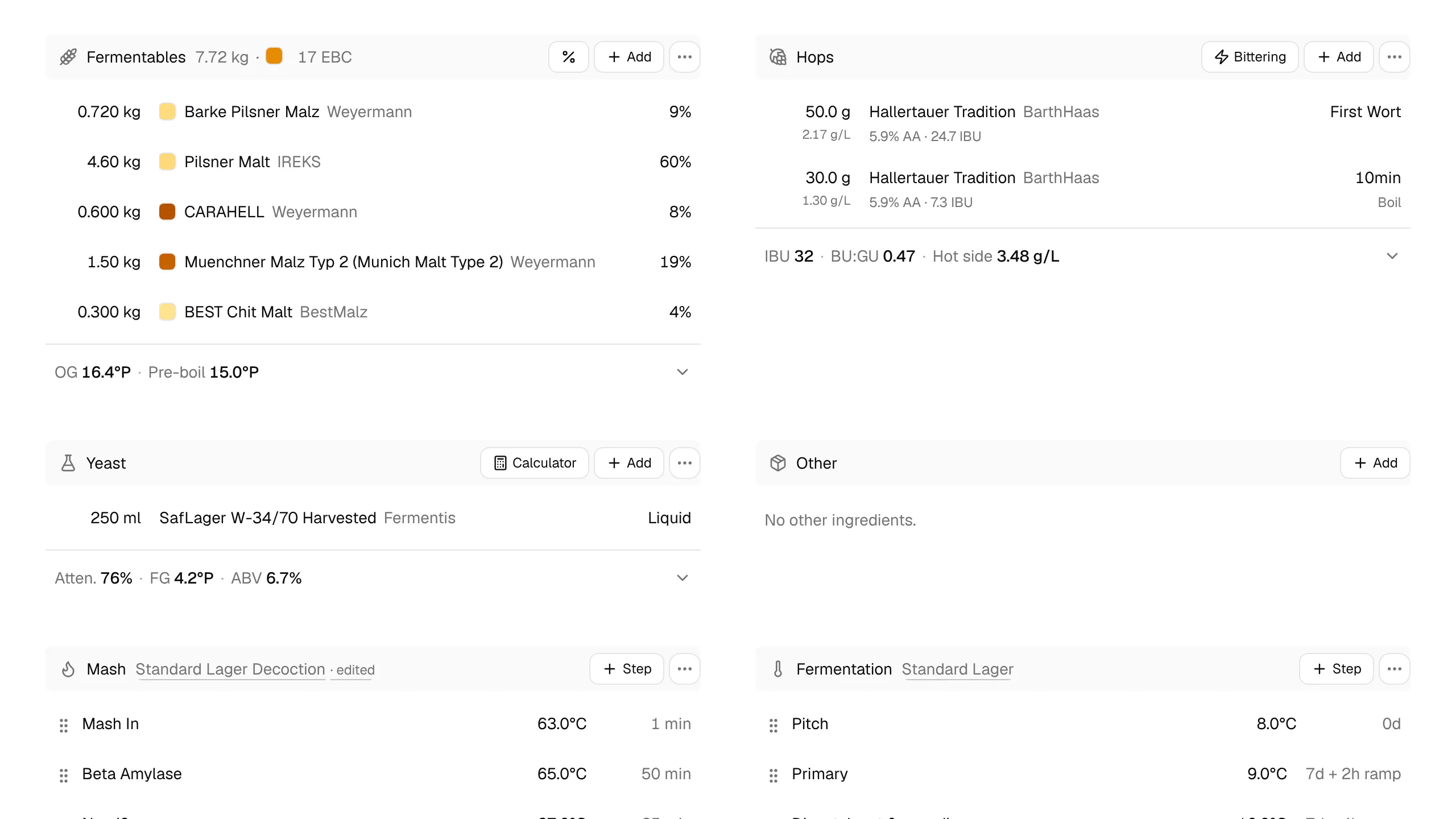
Each section has an Add button. The picker shows what is In stock in your inventory or All ingredients; pick one, enter the amount, and the numbers update at once.
- Fermentables: malts, sugars and extracts, with the share of the grist. The result line shows OG and Pre-boil gravity. % lets you enter the grist as percentages and a target OG instead.
- Hops: amount, alpha acid and use (Mash Hop, First Wort, Boil, Whirlpool, Dry Hop). The result line shows IBU, BU:GU and the hot side hop rate. Bittering works out the grams of a bittering hop for a target IBU.
- Yeast: strain and amount. The result line shows the expected Atten., FG and ABV. Calculator opens the pitch rate calculator.
- Other: water salts, finings, spices and anything else.
Mash, fermentation and water
- Mash: click the profile name to load a mash profile, or add steps with Step. The result line shows the Strike water and its temperature and the estimated mash pH.
- Fermentation: load a fermentation profile or add stages (primary, diacetyl rest, cold crash, …). The schedule drives your reminders, the calendar and the fermentation chart later on.
- Water: your source water, the salts you add and the estimated mash pH. Adjust opens the water calculator.
Original gravity. Every fermentable adds gravity points based on its potential (PPG), its weight, the batch volume and, for mashed grains, the efficiency. Sugars, extracts and boil additions count at 100 %:
points = weight (kg) × potential (points per kg per liter) × efficiency / batch volume (L) and OG = 1 + Σ points / 1000
Bitterness (IBU) uses the Tinseth formula:
IBU = alpha acid (decimal) × hop mg per liter × utilization
utilization = 1.65 × 0.000125^(gravity − 1) × (1 − e^(−0.04 × minutes)) / 4.15
First wort hops count as boil time + 10 minutes. Whirlpool additions and the hopstand use the hopstand temperature (or your hopstand curve), so hotter whirlpools add more bitterness.
Final gravity comes from the yeast's attenuation, adjusted for mash temperature and specialty malts. ABV is (OG − FG) × 131.25.
Color uses the Maische, Malz und Mehr formula (a malt color average scaled by gravity); EBC = SRM × 1.97.
All formulas: Brew calculations.
Plan the brew
When the recipe is ready, open the Brew Day tab and pick a date under Planned brew day. The idea becomes Planned, gets its batch number and appears in the calendar. Brewing for a date? Switch the dialog to Ready by and BrewForge works out the latest brew day for you (see Plan back from a ready-by date).
Next: brew day.