Brew day
Start brew day, deduct ingredients from inventory, log your measurements against the recipe's targets, and compare the batch with the recipe.
On brew day, open the Brew Day tab and click Start Brew Day. The brew moves to the status Brew Day and today becomes its brew date. The tab has everything you need at the kettle, and it is where you record what really happened.
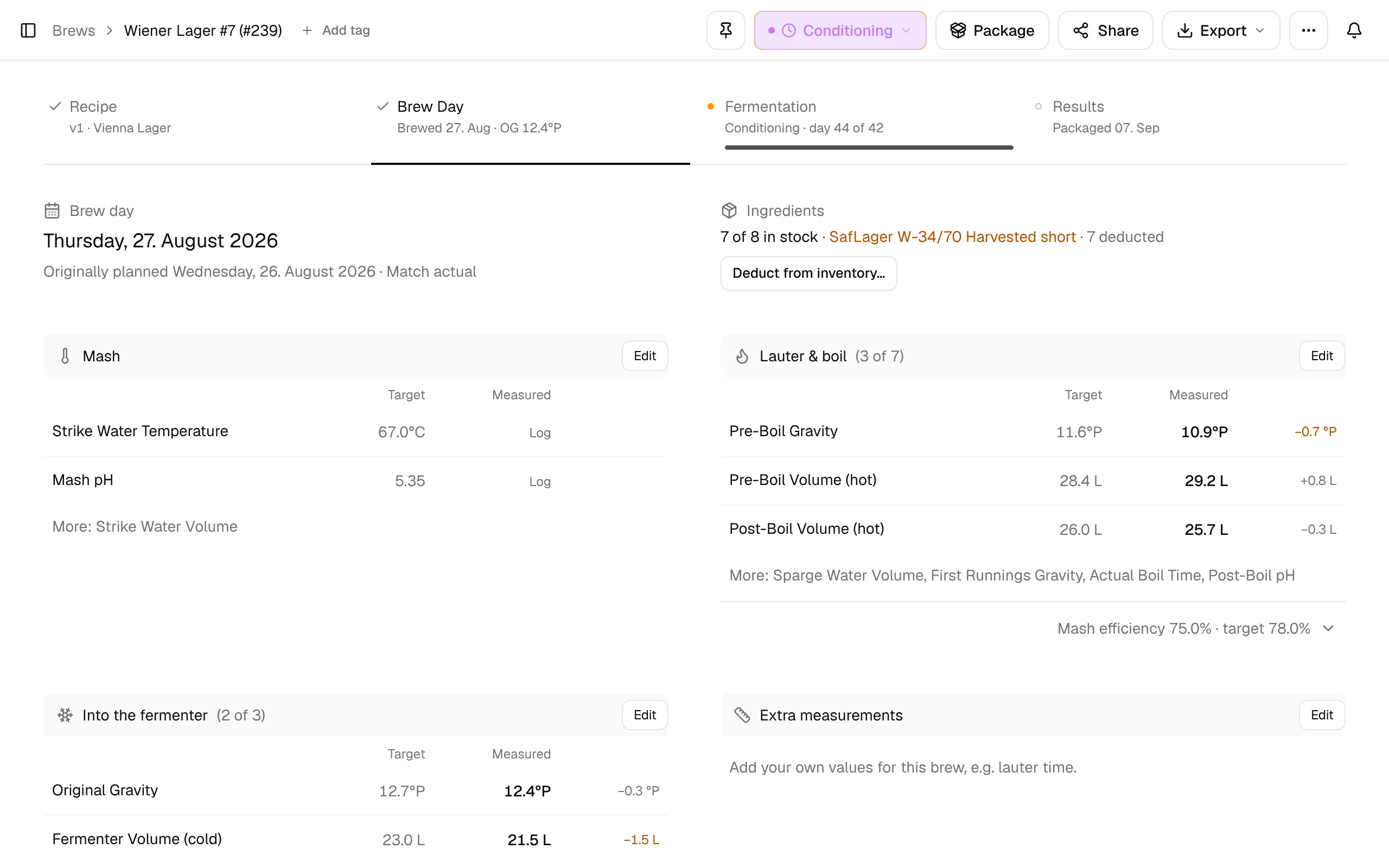
Before you start
- Export → PDF → Brew day sheet prints the plan in working order with fields for your measurements, if you prefer paper next to the kettle (see PDF exports).
- Ingredients checks the recipe against your inventory, for example "7 of 8 in stock". Deduct from inventory… takes what you used out of stock, so your inventory stays correct. Nothing is deducted until you confirm it.
Log your measurements
The measurements are grouped in the order you take them: Mash, Lauter & boil and Into the fermenter. Each row shows the recipe's Target, your Measured value and the difference, in amber when it is off.
Click a row (it says Log while empty) to enter one value, or Edit on a section to fill several at once. The most important values are always shown; the rest are listed under More: until you log them.
| Section | Always shown | Under More: |
|---|---|---|
| Mash | Strike Water Temperature, Mash pH | Strike Water Volume |
| Lauter & boil | Pre-Boil Gravity, Pre-Boil Volume (hot) | Sparge Water Volume, First Runnings Gravity, Actual Boil Time, Post-Boil Volume (hot), Post-Boil pH |
| Into the fermenter | Original Gravity, Fermenter Volume (cold) | Pitching Temperature |
You don't have to fill in everything. Once you have logged pre-boil gravity and volume, the line below Lauter & boil shows your mash efficiency next to the target.
Recipe vs batch
As soon as you log a value, Recipe vs batch compares the plan with your batch: OG, cold batch volume, ABV and brewhouse efficiency, each with the recipe value below it. All … values opens the full table with volumes, losses, gravities, bitterness, color and both efficiencies.
When a value is missing, BrewForge derives it from the ones you entered, following your When a brew day value is missing setting under Settings → General → Calculations (keep efficiency or keep the recipe value, see settings). Derived values are shown in blue.
Use the comparison to tune your equipment profile: if your boil-off or efficiency differs by the same amount on every brew, update the profile and the next recipe hits its targets.
mash efficiency = (pre-boil gravity points × pre-boil volume) / maximum points of the grain bill
brewhouse efficiency = (OG points × fermenter volume) / maximum points of the grain bill
The maximum is the potential (PPG) of each mashed fermentable times its weight. Gravity points are (SG − 1) × 1000.
Notes and finishing
Notes about this batch, such as a stuck sparge or a pH correction, go into the timeline at the bottom of the tab. They stay with the brew, so you can look them up the next time you brew the recipe.
When the wort is in the fermenter, click Complete Brew Day at the bottom of the tab. The brew moves to Fermenting and the Fermentation tab takes over.
All details: Brew Day tab.