Cellar
Plan which beer sits in which fermenter, tank or keg, see when each vessel frees up, package beer into kegs, bottles and cans, and keep track of your finished beer stock.
The Cellar shows what is in every vessel and when it frees up. You set up your fermenters, tanks and kegs once, then plan stays: a brew (or a bought beer) in a vessel for a span of days. When the beer is ready, you package it into kegs, bottles or cans, and it shows up in your Stock.
Pro plan
The cellar is part of the Pro plan and the plans above it. On other plans, opening the cellar takes you to the plans page.
Where to find it
The sidebar has two entries in the Cellar section. They wait under More until you add your first vessel (Cellar) or package beer (Stock), see how the sidebar works:
- Cellar (
/cellar): the overview with the timeline, planning and packaging. - Stock (
/cellar/stock): the finished beer you have on hand, in kegs and in bottles and cans.
Vessels at the top of the overview opens Vessels & Containers, where you set up your equipment.
The overview
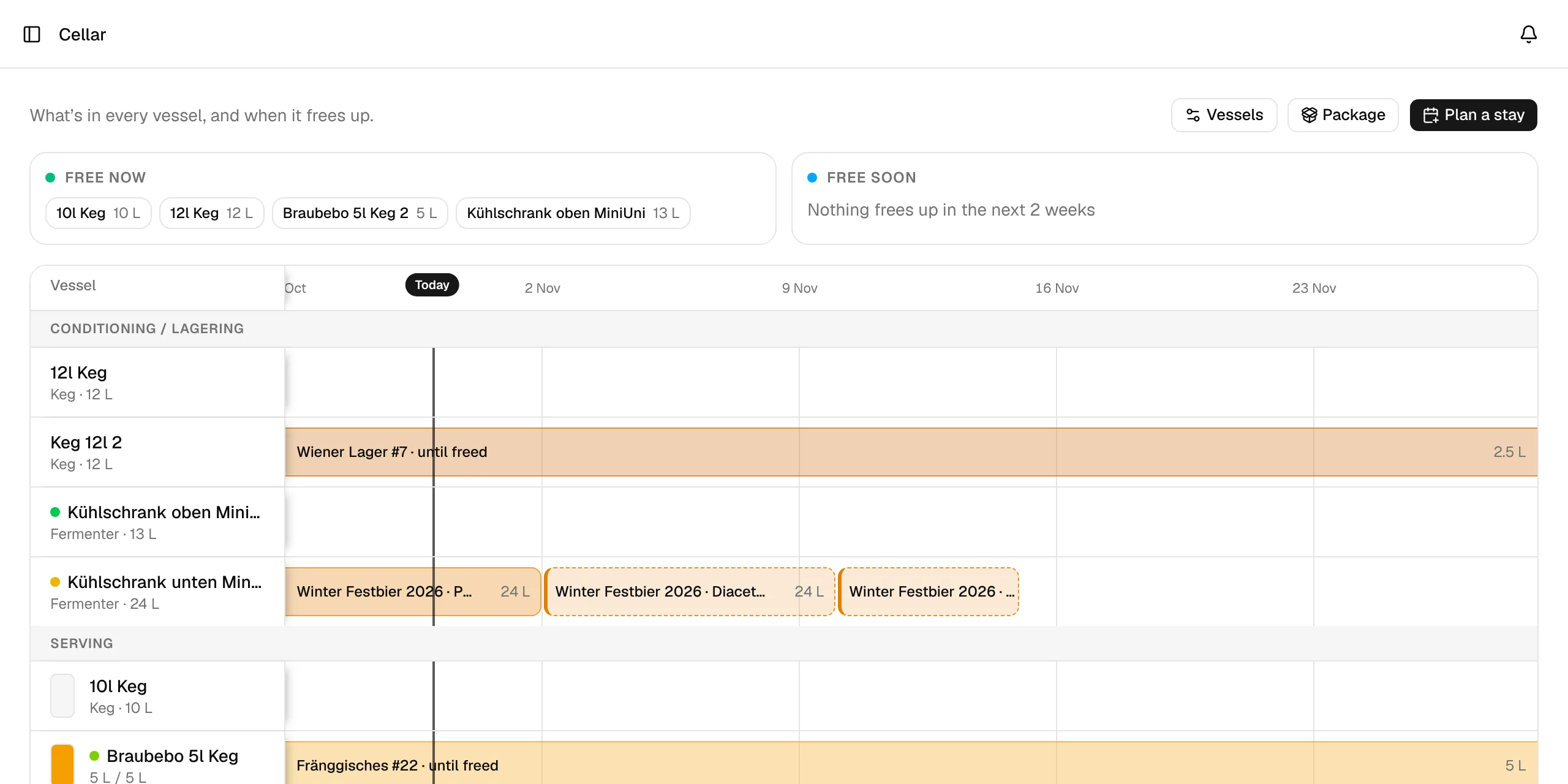
The line under the header says what the page is for: What's in every vessel, and when it frees up. Next to it are three buttons: Vessels, Package and Plan a stay.
Cellar at a glance
Above the timeline, three boxes answer the questions you usually have before a brew day:
| Box | What it lists |
|---|---|
| Free now | Vessels that hold nothing today. Each one shows its capacity, or until the day the next planned stay starts. |
| Free soon | Busy vessels that free up within the next 2 weeks, with the day they free up and how long they stay free. |
| Needs you | Serving kegs with less than 1 L left. Kegs are never freed automatically, so BrewForge asks Free?. Click one to open the stay. This box only shows when there is something to do. |
The timeline
The timeline has one row per vessel and shows three weeks back and eight weeks ahead. It opens at Today and scrolls sideways. Vessels are grouped the way beer moves through the cellar: Fermenting, Conditioning / Lagering and Serving.
- Each bar is a stay, labelled with the beer and the stay name. Its colour is the beer's colour from its recipe.
- The legend explains the bar styles: Planned (dashed outline), Now, Finished (faded) and Until freed (fades out to the right, because the stay has no end date).
- Serving kegs show a small fill gauge and the litres left next to their name.
- Click a vessel's name to see its serial number, what it's Used for, and Edit vessel.
- Click a bar to open the stay: edit it, free the vessel or package the beer. See Stays.
If you have no vessels yet, the overview says No vessels yet and offers Set up vessels.
What you can do
Vessels and containers
Stays
Packaging
Stock
Calculations
Your brews also appear in the cellar once they have a stay. The calendar can show when vessels are occupied and free again.