Keg sensors
Keep the litres left in a serving keg up to date with a keg scale or a volume (flow) sensor, including the weight-to-volume formula.
A keg scale or a volume sensor can keep the litres left in a keg up to date in your cellar. While a sensor is connected, it owns that number: BrewForge updates it with every reading, and you can't type it in by hand until you disconnect the sensor.
Pro plan
Keg sensors write to kegs in the cellar, which is part of the Pro plan.
Which devices can measure a keg
Hydrometers (iSpindel, Tilt, RAPT Pill and the others) only measure fermentation. A keg sensor is a Custom Stream device that maps a Weight or a Volume field, for example:
- a load cell under the keg (HX711 + ESP32, or a commercial keg scale) sending the total weight,
- a flow meter that reports the remaining volume.
Set it up
Create a Custom Stream device and map your weight (or volume) field with its unit. On the Devices page it is listed under Keg sensors and custom streams.
For a scale: open Cellar → Vessels, edit the keg and enter its Empty Weight (tare). Without it BrewForge can't tell beer from steel.
Connect the sensor to the keg, from either side:
- On the sensor's device page, click Connect in Connected to (or ⋯ → Connect…), switch to Keg, pick the keg and click Connect.
- In the cellar's Stock view, use Attach sensor on the serving keg and pick the sensor.
Only kegs that are serving right now and don't have a sensor yet are offered, each with the date it started serving.
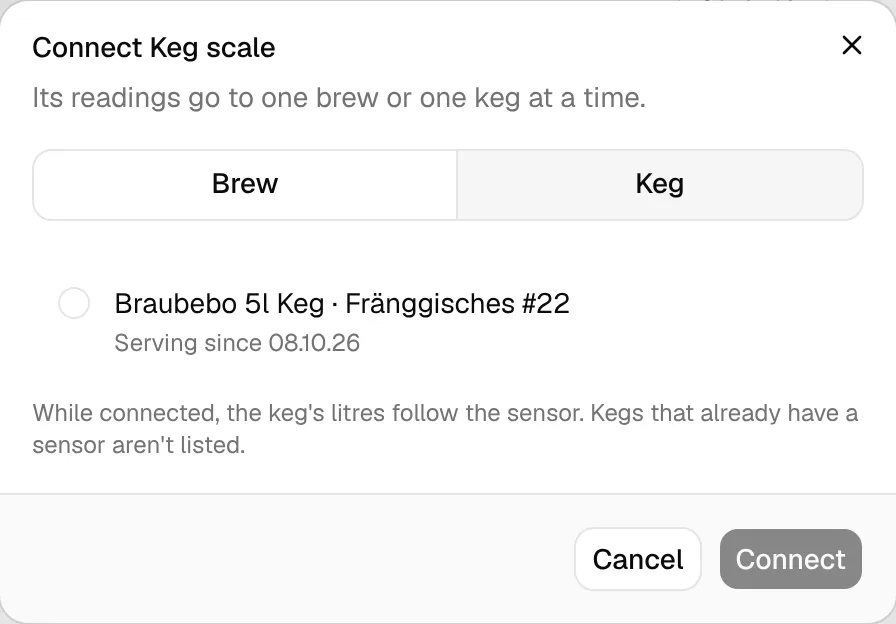
From the next reading on, the keg's litres follow the sensor. The stock view shows which sensor owns the number and how old its last reading is, and the device page says which keg it keeps up to date.
A device is either connected to a brew or to a keg: connecting it to one disconnects it from the other. To type the litres by hand again, disconnect the sensor (⋯ → Disconnect from … on the device page, or Detach in the Stock view).
A scale reports the total weight of keg and beer. BrewForge subtracts the keg's empty weight and divides by the beer's density, which is its final gravity:
litres = (weight in kg − empty weight in kg) / FG
For beer that isn't linked to a brew (manual stock), BrewForge assumes an FG of 1.010. The result is limited to between 0 and the keg's capacity, and sensor values keep full precision (whole millilitres).
Example: the scale reads 19.3 kg, the empty keg weighs 4.5 kg and the beer finished at 1.012 → (19.3 − 4.5) / 1.012 = 14.6 L.
A volume sensor reports litres directly; BrewForge only limits the value to the keg's capacity.