Fermentation profiles
Reusable fermentation schedules in BrewForge with stages, target temperatures, durations, ramp times and an optional spunding stage, and how the total duration is calculated.
A fermentation profile is a reusable temperature schedule: primary fermentation, diacetyl rest, cold crash, conditioning and so on, each with a target temperature and duration.
Open Settings → Profiles, switch to the Fermentation tab and click a profile, or create one with New fermentation profile. The list shows the number of stages, their temperatures and the total duration in days. Ready-made ale and lager schedules are in Browse templates.
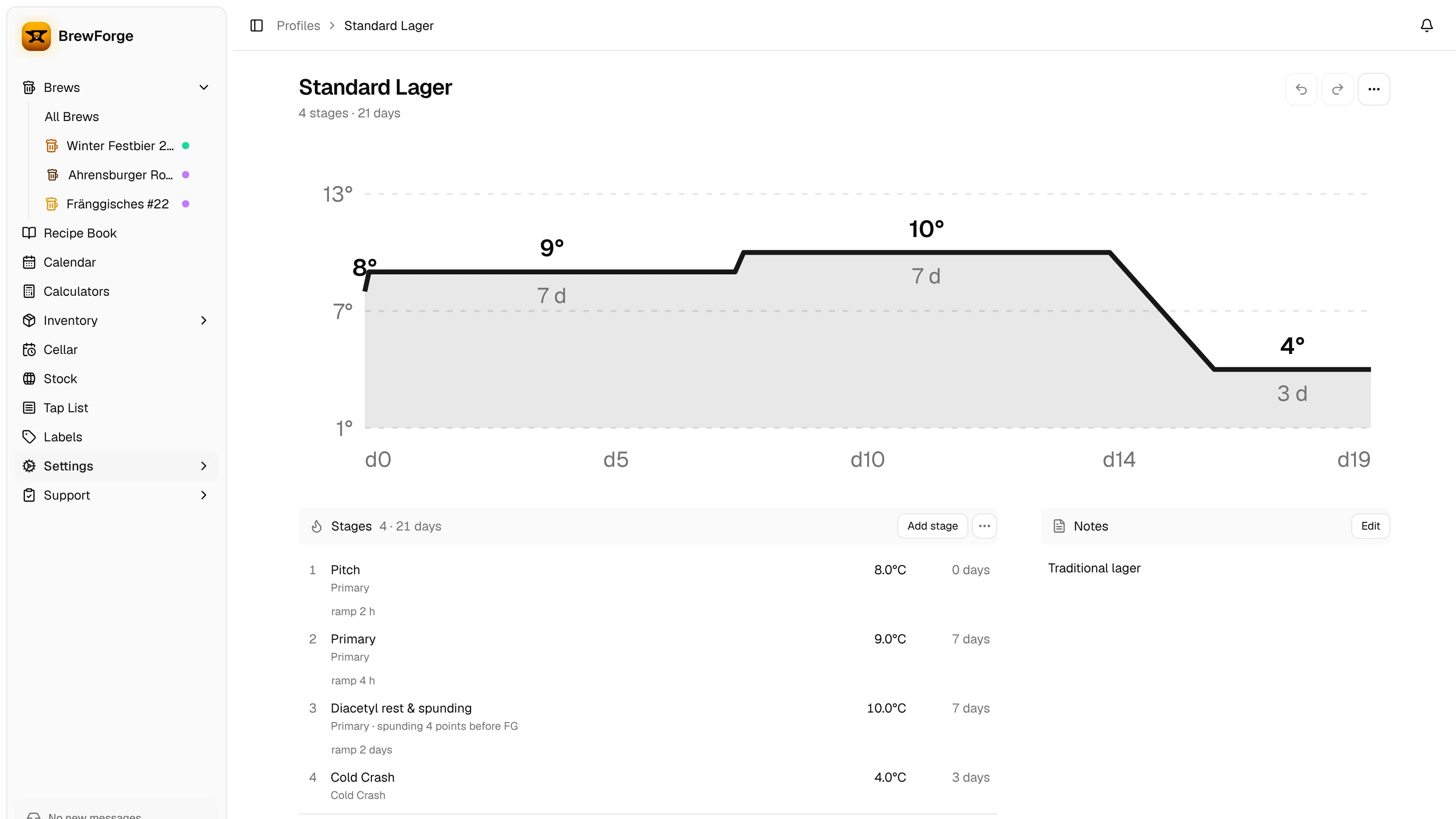
The chart shows the temperature over the days. Under each stage you see its type, a spunding note when it is the spunding stage, and the ramp to the next stage. The last line of the Stages section shows the total, ramps included.
stage days = duration + ceil(ramp time in hours / 24)
total duration = sum of all stage days
A ramp counts as whole days, rounded up. Example: primary 14 days, diacetyl rest 2 days with a 24 h ramp, lagering 28 days with a 48 h ramp: 14 + (2 + 1) + (28 + 2) = 47 days.
Stages
Click a stage to edit it, or Add stage to add one at the end. Reorder stages in the ⋯ menu of the section changes the order. The stage dialog has Delete as long as the profile has more than one stage.
| Field | Meaning |
|---|---|
| Name | Free text, for example "Diacetyl rest". |
| Type | Primary, Secondary, Cold Crash or Conditioning. Stages imported as tertiary or carbonation keep their type. Primary, secondary and tertiary count as fermentation; cold crash, conditioning and carbonation as conditioning (for progress, beer age, ready-by dates and the cellar plan). |
| Target temp | The temperature to hold during this stage. |
| Duration | How long to hold it, in days. |
| Ramp time | Under Ramp: how long the change from the previous stage's temperature takes, in hours. |
Spunding stage
Primary, Secondary and tertiary stages can be the Spunding stage. Spunding means closing the fermenter with a pressure valve before fermentation is finished, so the remaining fermentation carbonates the beer. BrewForge uses the pressure and temperature of this stage to calculate when you should start spunding.
- Tick Spunding stage to mark the stage. Only one stage per profile can be the spunding stage; the dialog tells you when another stage already is.
- Spunding pressure is required for the spunding stage and must be greater than zero. Other eligible stages can have an optional Stage pressure (under Ramp & pressure).
- Safety margin starts the spunding forecast earlier to cover headspace, leaks and model uncertainty. It is shown in gravity points, or in °P if you display gravity in Plato. The default is 4 gravity points (1 °P).
The margin is stored in gravity points. In Plato it is shown as:
°P = gravity points / 4
So the default of 4 points shows as 1 °P, and entering 1.5 °P stores 6 points.
The spunding forecast itself is calculated in the brew from your fermentation readings.
Notes
Edit in Notes renames the profile and holds free text (up to 500 characters).
Changes are saved right away. To update brews that already use the profile, use Apply to recipes….