Mash profiles
Save your mash schedules in BrewForge as reusable mash profiles with temperature, infusion and decoction steps, ramp times and temperature loss.
A mash profile is a reusable mash schedule: the steps from mash-in to mash-out with their temperatures and durations. Pick it in a recipe instead of entering the same rests every time.
Open Settings → Profiles, switch to the Mash tab and click a profile, or create one with New mash profile. The list shows the number of steps, their temperatures and the total time. More schedules, for example a single infusion or a step mash, are in Browse templates.
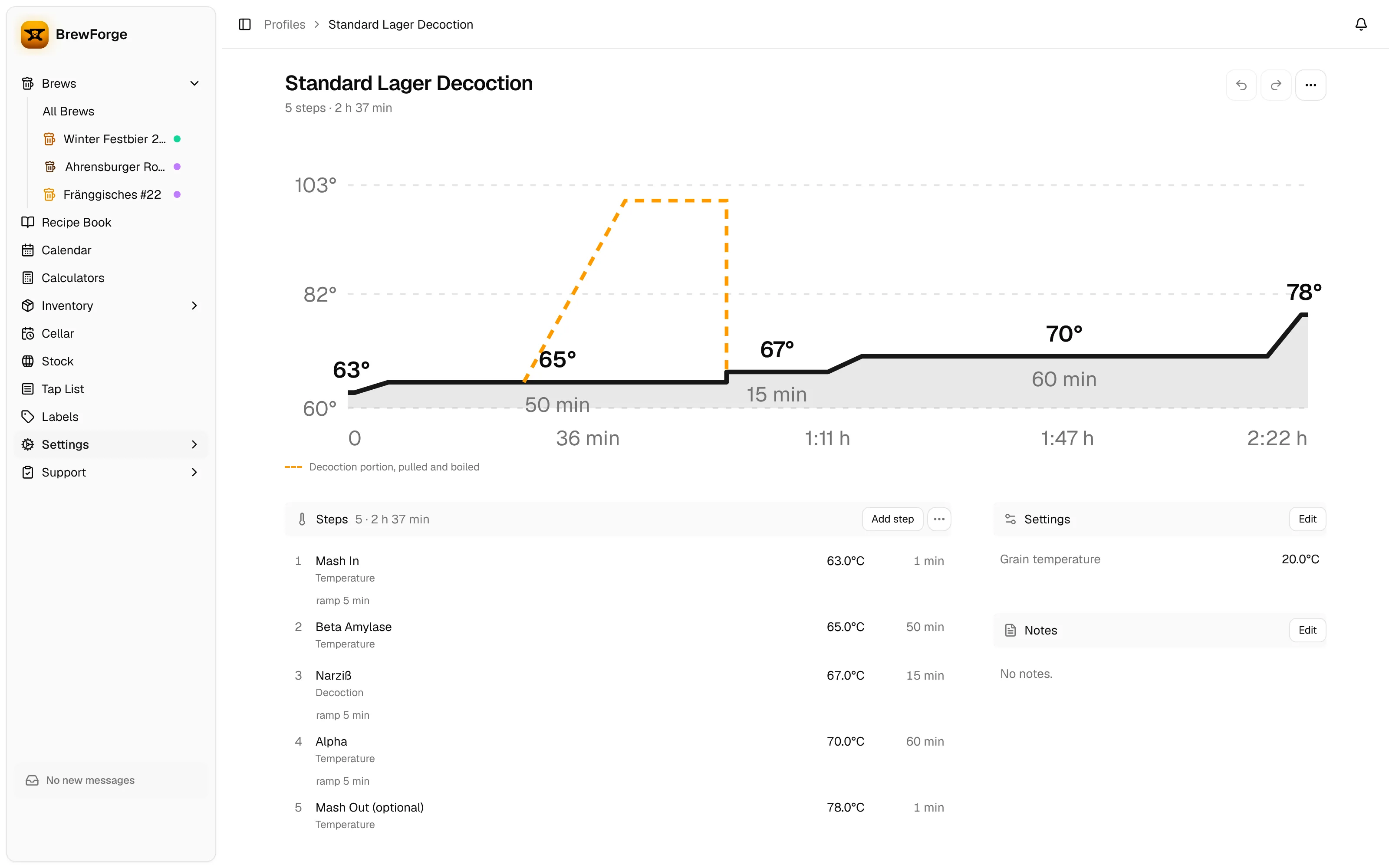
The chart at the top shows the temperature over time. A decoction appears as a dashed line: the portion that is pulled, heated and boiled before it goes back. The line under the title and the Steps header show the number of steps and the total time.
total time = sum of all step durations + sum of all ramp times
Example: 63 °C for 30 min, then 10 min ramp to 72 °C for 30 min, then 5 min ramp to 78 °C for 10 min: 70 + 15 = 85 min, shown as 1 h 25 min.
Steps
Click a step to edit it, or Add step to add one at the end. Reorder steps in the ⋯ menu of the section changes the order. The step dialog has Delete as long as the profile has more than one step.
Every step has a type, a Target temp and a Duration. The other fields depend on the type:
| Type | Fields |
|---|---|
| Temperature | Heat the mash to the target temperature. Ramp time (under Ramp & losses) is how long heating takes. |
| Infusion | Raise the temperature by adding hot water. Water temp is the temperature of that water (default 100 °C). Infusion water shows From each recipe: leave it empty and each recipe calculates it from its grist, or enter a fixed amount. |
| Decoction | Pull part of the mash, boil it and return it. Decoction volume is calculated from each recipe unless you enter one. Return temp (default 98 °C) is the temperature when the boiled part goes back, Boil duration (default 15 min) how long you boil it. Volume loss is what evaporates while boiling; Ramp time is how long heating the decoction takes. |
Temp loss (under Ramp & losses or Heat loss) is how many degrees the mash loses per hour during the rest.
If the first step is an Infusion, it is your mash-in: the dialog shows it as Strike, and the strike water and its temperature come from each recipe and the equipment profile.
Decoction timing warning
A decoction is pulled during the preceding rests: it has to be heated and boiled before it returns. If the rests before it are too short, BrewForge shows a warning under the step, for example "Narziß decoction needs 30 min (15 ramp + 15 boil) but only 20 min of preceding rest available. Increase preceding rest by 10 min."
time needed = ramp time + boil duration
time available = sum of the durations of all earlier steps + ramp times of the earlier non-decoction steps (from step 2 on)
The warning appears when time needed > time available, and suggests extending the preceding rest by time needed − time available. Without values, a decoction counts with 10 minutes ramp time and 15 minutes boil. A decoction as the very first step is not checked.
Example: Mash In 1 min, Beta Amylase 50 min with 5 min ramp, then a decoction with 5 min ramp and 15 min boil. Available: 1 + 5 + 50 = 56 min, needed: 20 min, so no warning.
Settings
Grain temperature is the temperature of your grain at mash-in, usually room temperature. It is used for the strike temperature.
Notes
Edit in Notes renames the profile and holds free text (up to 500 characters).
Changes are saved right away. To update brews that already use the profile, use Apply to recipes….
In a recipe, the step dialog also calculates strike water, infusion water and decoction volumes from the grist. See Mash steps.