Packaging
Package beer from a fermenter or tank, or straight from a brew, into kegs, bottles and cans in one step, record loss, and move a keg into bottles with repackaging.
Packaging moves beer into kegs, bottles or cans in one step. You pick where the beer comes from, add what you fill, and BrewForge updates the cellar and your stock together.
Pick the source
Click Package on the cellar overview, or Package… in a current stay.
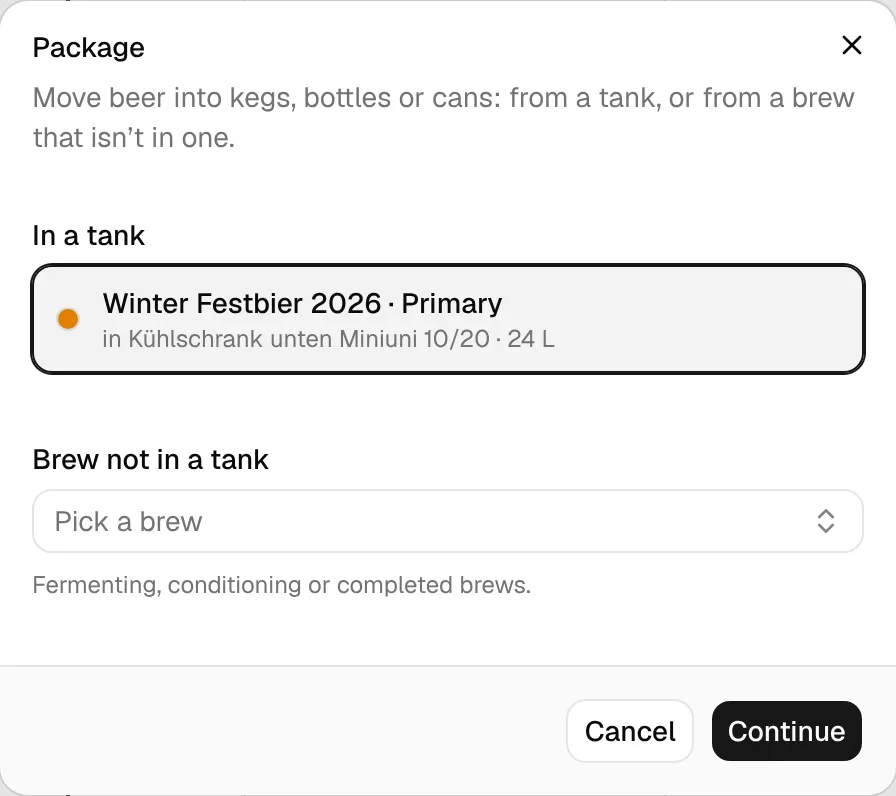
- In a tank lists every beer that is in a fermenter or tank today (current fermenting and conditioning stays) with its vessel and volume.
- Brew not in a tank lets you pick a fermenting, conditioning or completed brew that isn't in any vessel, for example when you don't plan fermenters in the cellar.
Then click Continue.
Fill kegs, bottles and cans
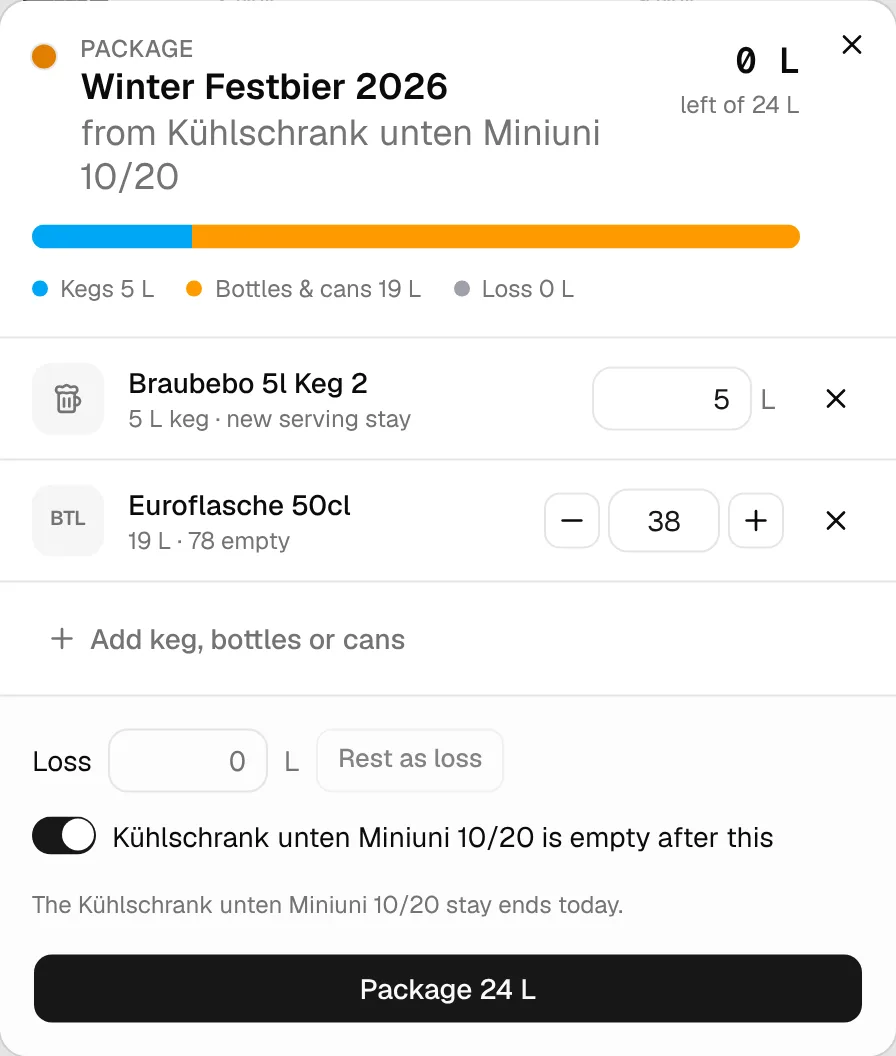
The top shows the beer, where it comes from, and how many litres are left of what's available. The bar splits the beer into Kegs, Bottles & cans and Loss.
If the source has no recorded volume, BrewForge estimates it from the brew and marks it (est.). You can correct the litres in the source field.
Click Add keg, bottles or cans and pick targets:
- Kegs: your vessels set up for serving. Kegs that aren't free say why (for example "Holds …" or "Planned from …"). Each keg you fill gets a new serving stay that runs until you free it. Enter the litres in it.
- Bottles & cans: your containers, with how many empty ones you have. Set the count with −/+ or type it.
New rows start with what's left in the source: a keg up to its size, bottles as many as the rest fills.
Enter any Loss in litres, or click Rest as loss to book whatever is left as loss. Loss is only used for the arithmetic and isn't stored.
Leave … is empty after this on if the source is now empty: a tank stay then ends today and the vessel is free. Switch it off if beer stays in the tank; the stay keeps going with the litres that are left.
Click Package with the litres, for example Package 24 L. The result screen lists what changed.
Packaging straight from a brew packages all of it. The brew's packaging date is set to today when it is fully packaged, or on its first partial packaging.
Warnings and blocks
Real-world volumes are fuzzy, so most mismatches only warn:
- litres not accounted for when the source is marked empty (fine if it was trub, otherwise add it as loss),
- more packaged than the recorded or estimated volume (BrewForge goes with what you entered),
- more bottles or cans than you have empty ones.
Two things block confirming: taking more out of a tank that keeps going than it holds, and filling a keg beyond its size.
Repackage a keg
To bottle what's left in a keg, open the keg's stay and click Repackage…. It works like packaging, with the keg as the source. Marking the keg empty sets it to 0 L, but the keg stays on tap until you free it: kegs are never freed automatically. The result screen asks whether the keg is empty now and offers to free it. A keg that was filled today can only be freed from tomorrow.
See Calculations for how the litres are added up.