Plans and checkout
BrewForge plans compared: Free, Basic and Pro, yearly prices, the free trial month, upgrading, changing and cancelling, discounts at checkout, the Brewfather migration discount and what happens after payment.
The plans page shows the three BrewForge plans side by side, which one you are on, and the discounts you get when you subscribe. You start a subscription here, and you switch to the billing portal to change or cancel one.
You reach it in three ways:
- Subscription in the account menu at the bottom of the sidebar (your plan shows next to it).
- Upgrade plan or Change plan in the Plan section of the Account page.
- Use at checkout on the Bounty points page.
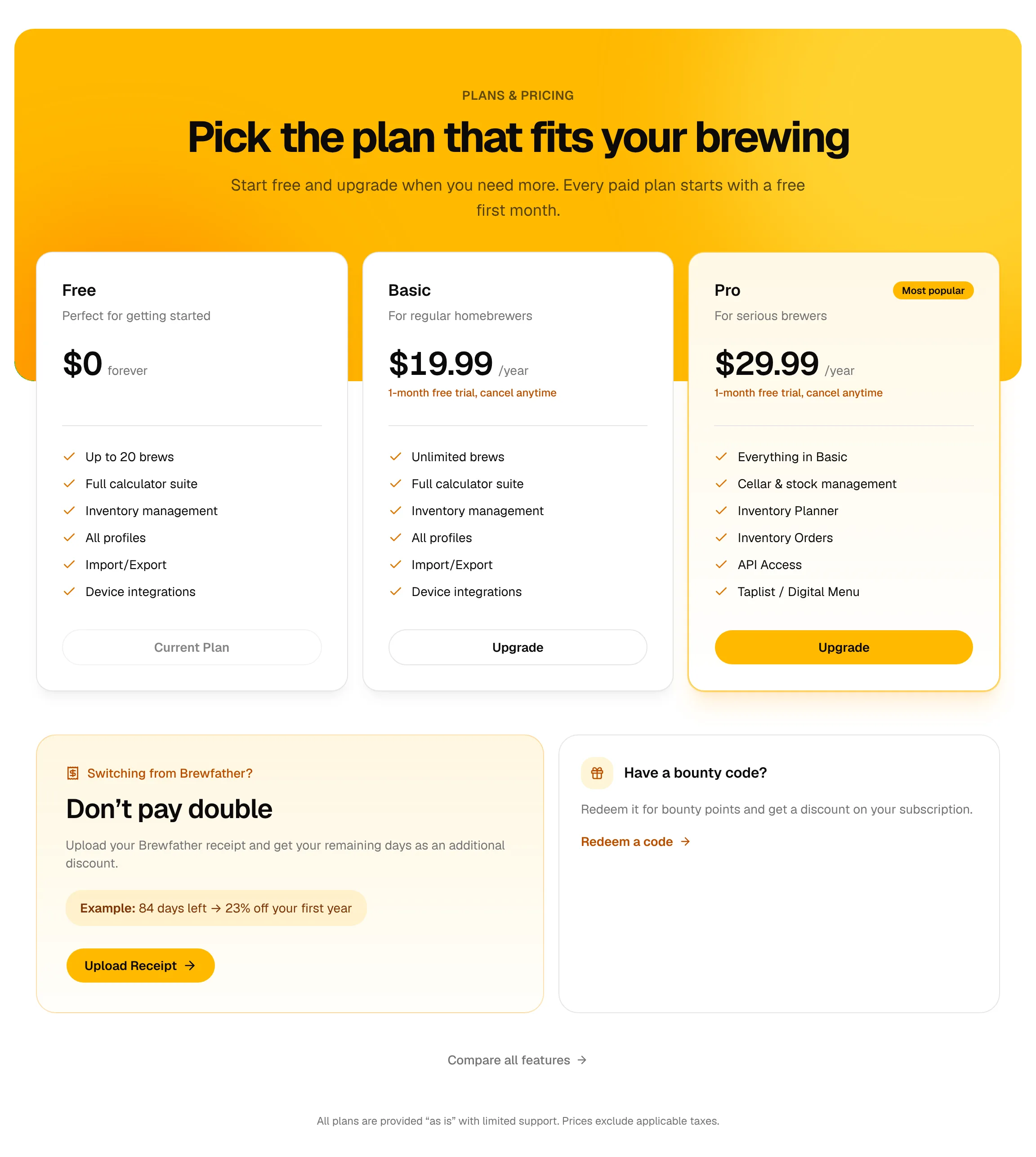
The plans
Each card shows the plan's name, who it is for, the price and what it includes. Pro is marked Most popular.
| Free | Basic | Pro | |
|---|---|---|---|
| Price | $0 forever | $19.99 /year | $29.99 /year |
| Free trial | – | 1 month | 1 month |
| Brews | Up to 20 | Unlimited | Unlimited |
| Recipes, brew days, fermentation, calculators, inventory, profiles, import/export, device integrations | ✓ | ✓ | ✓ |
| Cellar and stock | ✓ | ||
| Inventory planner and orders | ✓ | ||
| Tap list (menus and screens) | ✓ | ||
| Labels | ✓ | ||
| BJCP and Lagerbernd evaluation sheets | ✓ | ||
| TRMNL plugin | ✓ | ||
| API access | ✓ |
The cards list the main points; Compare all features under them opens the full comparison on brewforge.sh/pricing. Pages of Pro features are marked Pro in this documentation's sidebar.
With more than 20 brews on Free, only the 20 most recently updated brews can be edited; the others stay readable. See Locked brews.
Prices and billing
- Yearly only. Basic and Pro are billed once a year. There is no monthly option.
- In US dollars, without taxes: the note at the bottom of the page reads "Prices exclude applicable taxes". Taxes are added at checkout depending on where you live.
- One month free. Basic and Pro start with a free trial month ("1-month free trial, cancel anytime"). If you cancel during the trial, you aren't charged.
- Where the prices come from: the page shows the prices set in BrewForge. The amount you are charged, the trial and the taxes come from the product in our payment provider Polar, which runs the checkout and the billing portal. The checkout page always shows the final amount before you pay.
Subscribe or upgrade
Click Upgrade on the Basic or Pro card. (If you have a discount, the button reads Upgrade with 30% off or similar, see Discounts.)
The Before you subscribe dialog opens. It explains that the paid features start right away, and that you waive your 14-day EU right of withdrawal once the service has started. It also repeats the free trial month.
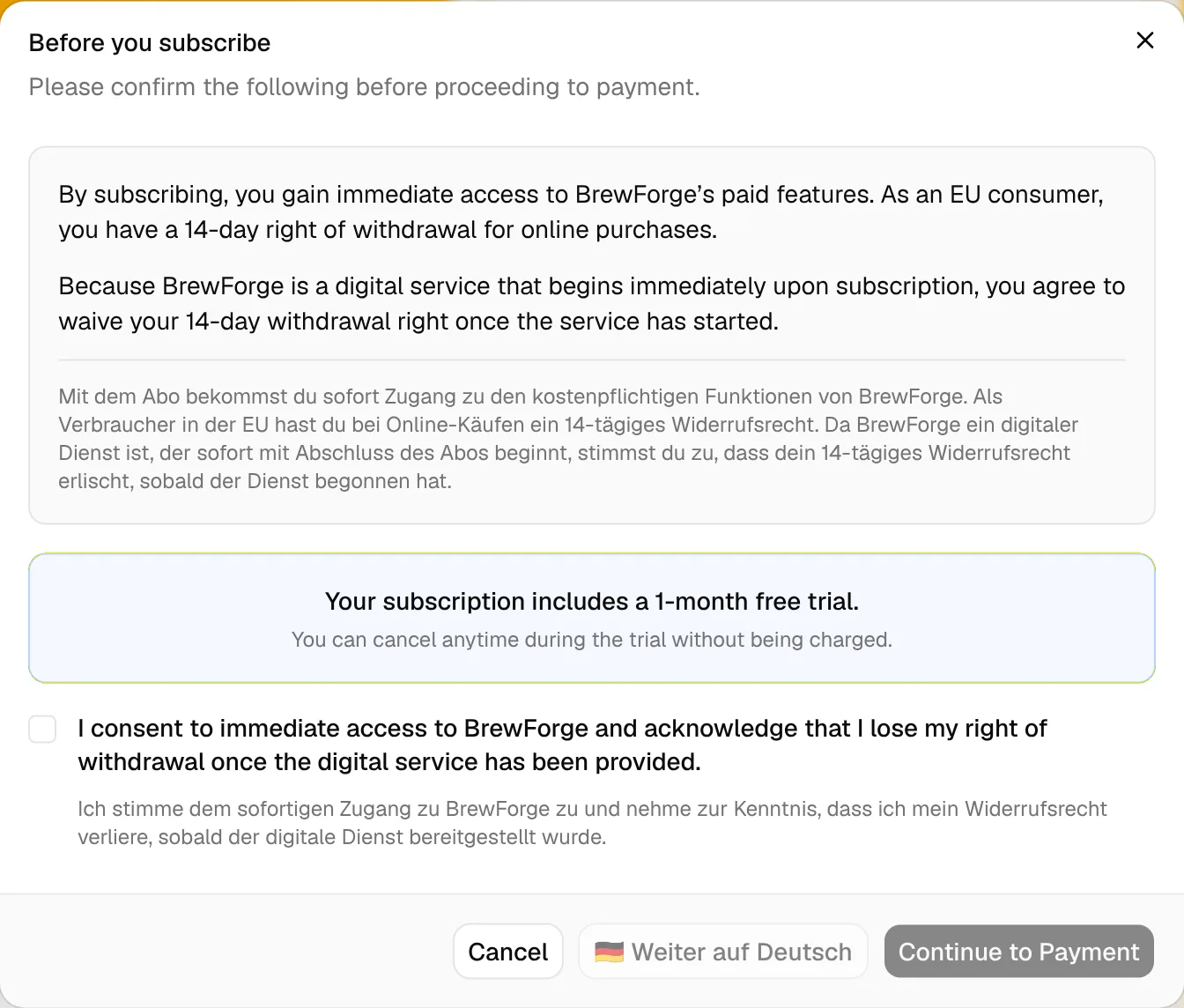
In the English app the text and the checkbox are repeated in German below.
Tick the checkbox. The buttons only work once it is ticked.
Click Continue to Payment, or Weiter auf Deutsch to open the checkout page in German.
Polar's checkout page opens. Enter your payment details there and confirm. Afterwards you come back to BrewForge (see After checkout).
Cancel closes the dialog without doing anything. If you aren't signed in, Upgrade takes you to the sign-in page first.
Your current plan
The card of your plan shows Current Plan. What the other cards offer depends on it:
| You are on | Free card | Basic card | Pro card |
|---|---|---|---|
| Free | Current Plan | Upgrade | Upgrade |
| Basic | Free Forever | Current Plan | Upgrade |
| Pro | Free Forever | Downgrade | Current Plan |
With a paid subscription, a Manage Subscription button shows under the cards, and the Brewfather card is gone (the migration discount is only for new subscriptions).
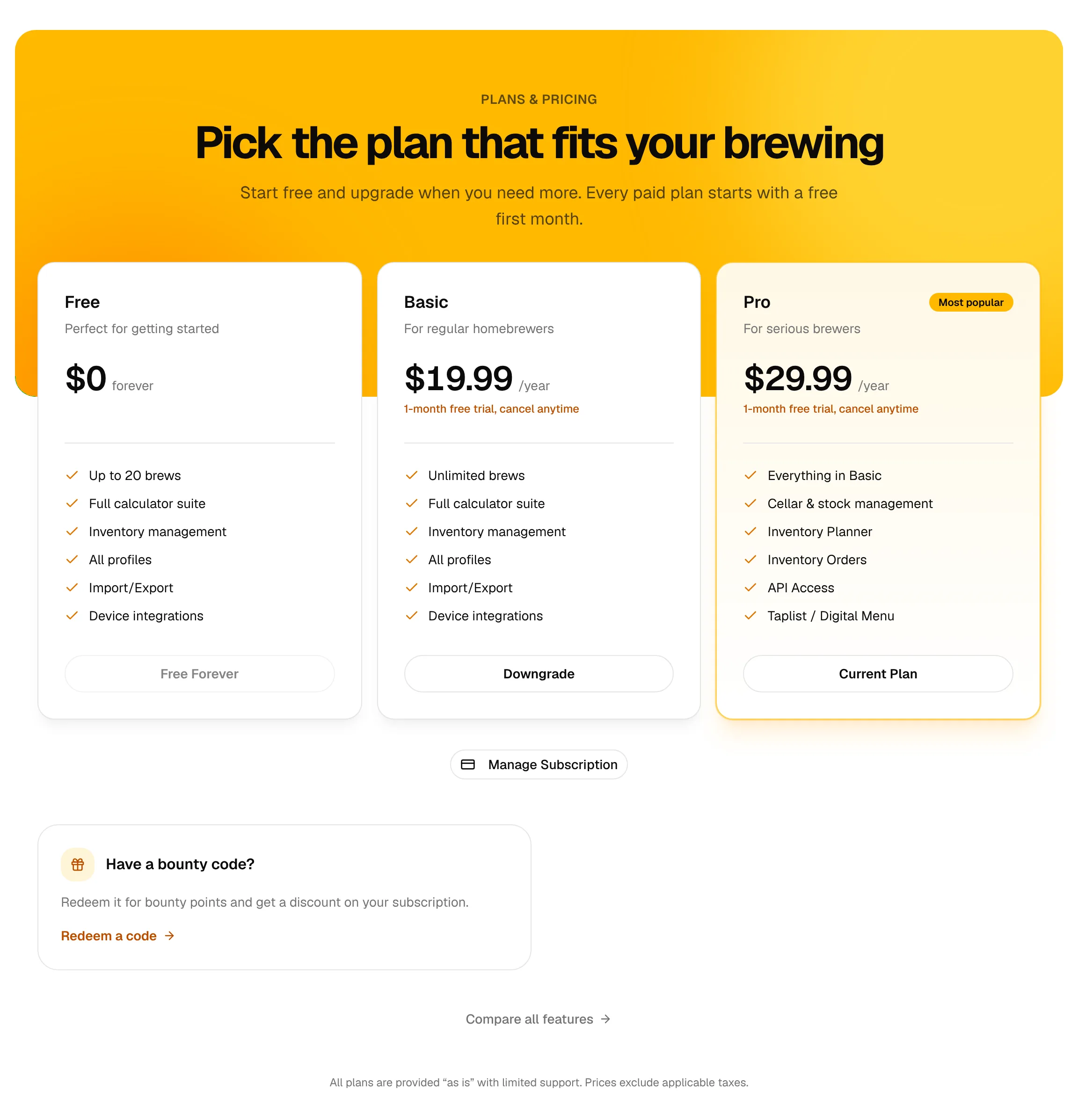
Change or cancel your plan
Manage Subscription, Current Plan (on a paid card) and Downgrade all open Polar's billing portal in a new page. There you:
- cancel your subscription,
- change your payment method and see your invoices,
- switch to a lower plan.
The same portal opens from Manage billing on the Account page.
Upgrade on a higher plan (Basic → Pro) goes through the subscribe steps above, with the dialog and Polar's checkout.
Plan states
| State | What you see | What you can use |
|---|---|---|
| Free | Free is the Current Plan, Basic and Pro offer Upgrade. | Everything in Free, up to 20 brews. |
| Trial and Active (Basic or Pro) | Your plan is the Current Plan, with Manage Subscription. The Account page shows the status, the current period and the next payment. | Everything in your plan. |
| Cancelled | The plans page doesn't change until the period ends. The Account page reads cancelled, ends with this period and Access until with the last day. | Everything in your plan until that day, then Free. Your brews stay; beyond 20, the older ones become read only. |
| Past due or unpaid | A payment failed. The Account page marks the status in amber with Update your payment method in billing. While a payment is open, BrewForge treats your account as Free, so the plans page shows Free as your plan. | Free features until the payment goes through. Fix the payment method with Manage billing on the Account page rather than starting a new subscription. |
Discounts
Discounts are applied automatically when you subscribe to Basic or Pro. You don't enter anything at Polar's checkout. With a discount, the Basic and Pro cards turn green and show a badge (for example 30% Off), the discounted price per first year, the normal price crossed out and "Then $29.99/year". The button reads Upgrade with 30% off.
A banner under the cards explains where the discount comes from:
- Bounty Discount Available!: your bounty points. Each point is 10% off. The points are taken off your balance when the subscription is created, also if it starts with the trial month.
- Stacked Discounts!: two or more sources added up, for example "20% migration + 30% bounty = 50% off!".
- Promotion banner (for example "Black Friday Discount!"): a running promotion you qualify for.
Sources that can add up:
| Source | How you get it |
|---|---|
| Bounty points | Feedback, reward codes, referrals. See Bounty points. The card Have a bounty code? links to Redeem a code. |
| Brewfather migration | An approved receipt, see Brewfather migration below. |
| Promotion | Only while BrewForge runs one. A code promotion shows a Have a promo code? card where you type the code and click Apply. Messages: Promo code applied!, or Invalid code with "This promo code has expired", "… is not yet active" or "… has reached its maximum redemptions". |
discount = min(promotion % + migration % + bounty %, 100 %)
first-year price = price × (1 − discount)
Bounty points only fill up to 100 %: points used = ceil(min(bounty %, 100 % − promotion % − migration %) / 10). The rest stays on your balance. Details and an example: Use your points.
Example: 23 % migration and 3 bounty points (30 %) on Pro: 53 % off, $29.99 × 0.47 = $14.10. The card rounds the shown price to whole dollars ($14); the checkout shows the exact amount.
The discount is for the first payment only. Renewals cost the normal price.
If the discount can't be prepared, a Discount Error message appears and the checkout doesn't open. Try again later or contact support.
Brewfather migration
If you are moving from Brewfather and still have time left on a paid Brewfather subscription, BrewForge turns the remaining days into a discount on your first BrewForge year, so you don't pay twice.
The card Switching from Brewfather? ("Don't pay double") shows on the plans page as long as you don't have a paid BrewForge subscription. Upload Receipt opens the Brewfather Migration page.
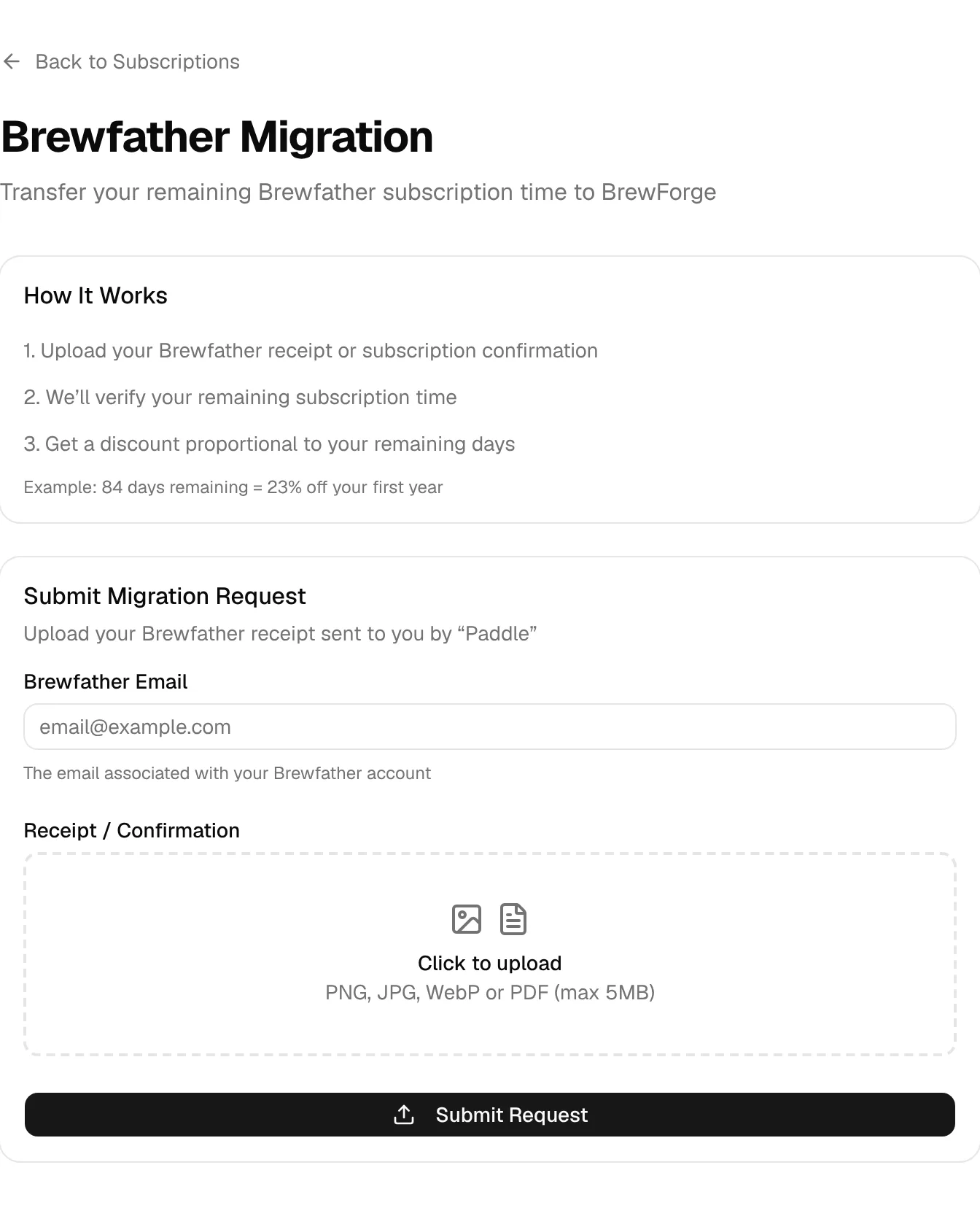
Find the receipt Brewfather's payment provider Paddle sent you, or your subscription confirmation. A screenshot works too.
Enter your Brewfather Email (the address of your Brewfather account).
Under Receipt / Confirmation, click Click to upload and choose the file: PNG, JPG, WebP or PDF, at most 5 MB. Images show a preview; the × removes the file again.
Click Submit Request. BrewForge reads the receipt (Analyzing Your Receipt, this can take a moment).
discount % = round(days left / 365 × 100), at most 100 %
Days left are counted in whole days from the day you submit to the end date on the receipt.
Example: 84 days left → 84 / 365 × 100 = 23.0 → 23 % off your first year.
Request states
The migration page and the card on the plans page show where your request stands:
| State | What it means |
|---|---|
| Migration Approved! | The receipt was clear and you see the discount right away ("You've earned a 23% discount"). Choose Your Plan goes back to the plans page, where the card reads "23% discount ready" and Basic and Pro show the discounted price. |
| Under Review / Migration Under Review | The receipt couldn't be confirmed automatically, so a person checks it. The page shows when you submitted. Come back later: the result shows on the migration page. View Request on the plans page opens it. |
| Request Not Approved | The receipt couldn't be verified. If a reason was given, it shows under Reason:. You can send a new request with better documents right below; Try Again on the plans page leads there. |
Rules and messages
- Only Brewfather subscriptions bought after 31 March 2025 count ("Only Brewfather subscriptions purchased after March 31, 2025 are eligible for migration").
- One migration discount per account ("You have already used the migration discount").
- One open request at a time ("You already have a pending request").
- Each receipt once ("This receipt has already been used for a migration request").
- Missing email or file: "Please provide both your Brewfather email and receipt". Wrong file: Invalid file type or File too large.
The discount is used with your first subscription and adds up with bounty points and promotions (see the formula above). To bring your Brewfather recipes and batches over, use the Brewfather import.
After checkout
After paying at Polar you land on the after-checkout page (/checkout/success). It first shows Processing your subscription… for a moment while BrewForge picks up the subscription from Polar.
- Welcome to BrewForge! "Your Pro subscription is now active." with Go to Dashboard and Create Your First Brew. The checkout ID is shown for reference, and the hint points to your account settings for managing the subscription.
- Almost there! The payment went through, but BrewForge couldn't activate the subscription yet. The reason is shown in red, with your Checkout ID. Click Try Again; Polar sometimes needs a few seconds longer. If it keeps failing, contact support with the checkout ID.
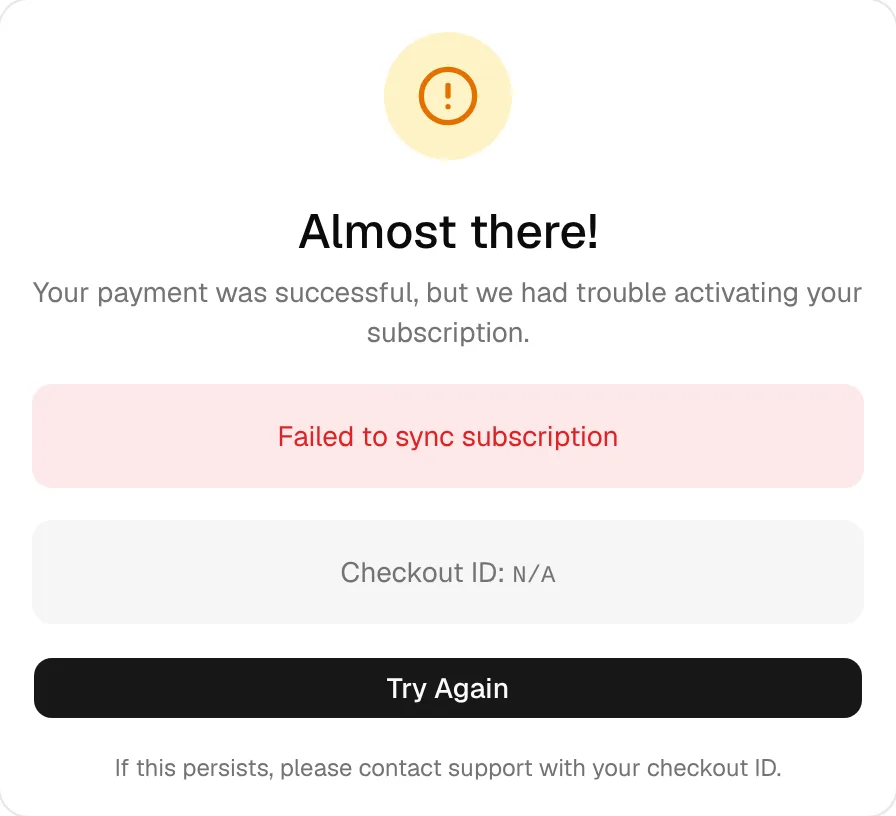
Your plan also updates on its own once Polar confirms the payment, so it shows on the Account page shortly afterwards even if you closed this page.
Legal
The note at the bottom of the plans page reads: "All plans are provided 'as is' with limited support. Prices exclude applicable taxes." The full terms are linked at the bottom of the Account page.