Bounty points and referrals
Earn BrewForge bounty points with feedback, reward codes and by referring friends, then use them for up to 100% off a Basic or Pro subscription.
Bounty points are BrewForge's way of saying thanks. You earn them by sending feedback, redeeming reward codes and inviting friends who then subscribe. Each point is 10% off a Basic or Pro subscription, up to 100%.
Open the page from the menu at the bottom of the sidebar: click your name, then Refer a friend. Once you have points, the menu entry shows your balance next to it (for example 3 points).
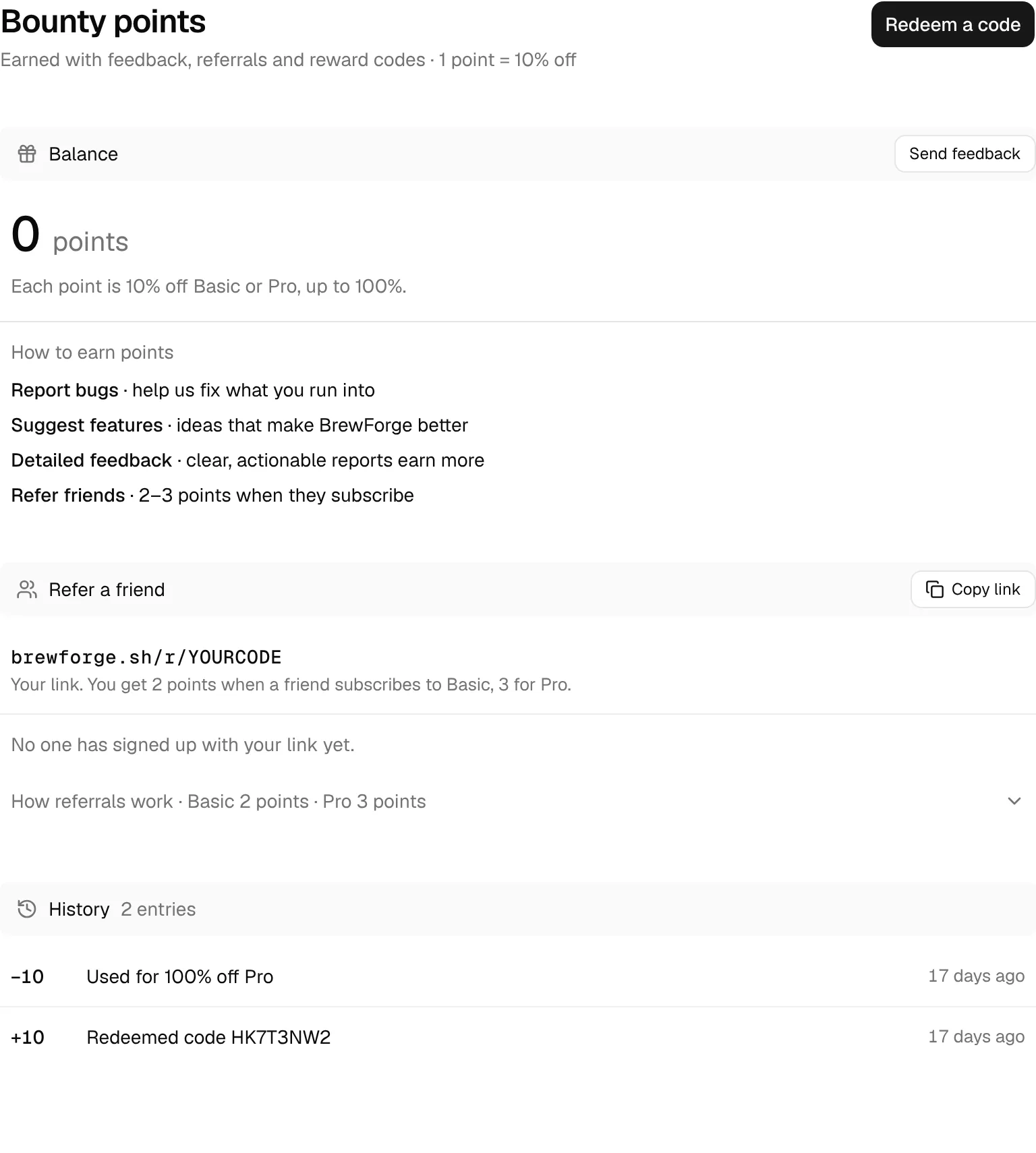
The page has three sections: Balance, Refer a friend and History. Redeem a code at the top opens the dialog for reward codes.
Balance
The big number is your current balance. The line below it says what it is worth:
- No points yet: "Each point is 10% off Basic or Pro, up to 100%." The ways to earn points are listed right below, and the section bar has a Send feedback button.
- 1 to 10 points: the discount on your next Basic or Pro subscription, for example "30% off your next Basic or Pro subscription". The section bar reads applied automatically at checkout and has a Use at checkout button that opens the plans page.
- More than 10 points: "100% off your next Basic or Pro subscription · 10 points are used per checkout". The rest stays on your balance.
With points on your balance, the ways to earn more are folded away under How to earn points.
discount = min(points, 10) × 10 %
Example: 3 points are 3 × 10 % = 30 % off. 14 points are capped at 10 points, so 100 % off, and 4 points stay on your balance.
How to earn points
| Way | Points |
|---|---|
| Report bugs, Suggest features, Detailed feedback | The BrewForge team awards 1 to 3 points per award for feedback you send. Clear, actionable reports earn more. |
| Redeem a reward code | What the code is worth, up to 10 points per code. |
| Refer friends | 2 points when a friend you invited subscribes to Basic, 3 points for Pro or a higher plan. |
Send feedback with the feedback button in the app (or Send feedback on this page). Points for feedback are not automatic: the team reads your report and awards them by hand. They show up in your history with the feedback they are for.
Refer a friend
Every account has its own referral link, shown in the Refer a friend section (brewforge.sh/r/…). Click Copy link to copy it and send it to friends.
Share your link. Your friend opens it and lands on the BrewForge home page.
Your friend signs up. They appear in your list as Signed up.
They subscribe to Basic or Pro. The entry changes to Subscribed to Basic (or Pro) and shows the points you got.
You get the points: 2 for Basic, 3 for Pro. Pro, AI and Commercial all count as Pro.
The steps are also in the fold How referrals work under the list. Once someone has signed up, the section bar sums it up, for example "3 sign-ups · 1 subscribed · 2 points". Before that it says "No one has signed up with your link yet."
Conditions, as BrewForge handles them:
- The link remembers your friend for 30 days. Your friend has to create the account in the same browser within 30 days of opening the link.
- Only new accounts count. If your friend is already signed in when they open the link, nothing is recorded. You can't refer yourself.
- Points come with the first subscription payment. Renewals, upgrades and later plan changes don't award more points. Each friend earns you points once.
- Your friend doesn't get a discount through the link. They sign up for a normal free account and can use any discount they have of their own (their own bounty points, a promotion).
- There is no limit on how many friends you can refer.
The list shows up to the 50 most recent sign-ups with their name, status and when they signed up. A friend without a name is listed as "Anonymous".
Redeem a reward code
Reward codes are printed on BrewForge cards or handed out at events. A code has 8 letters and numbers, for example HK7T3NW2.
Click Redeem a code at the top of the page.
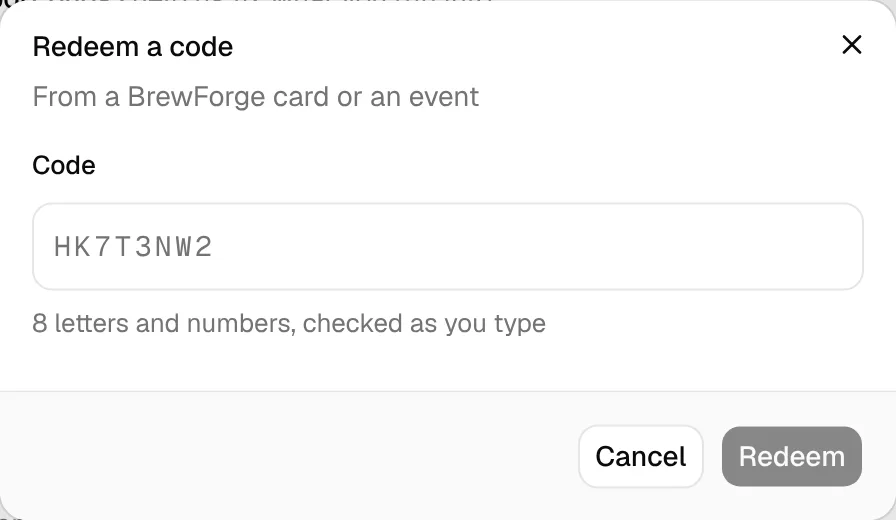
Type the code. Upper or lower case doesn't matter, and spaces or dashes (HK7T-3NW2) are removed. As soon as all 8 characters are in, BrewForge checks the code.
A valid code shows what it is worth (for example "3 points · 30% off Basic or Pro") and your Balance before and after redeeming.
Click Redeem 3 points (the button names the points). The dialog shows "3 points added" and your new balance. Redeem another starts again with an empty field, See plans opens the plans page, Done closes the dialog.
If the code doesn't work, the dialog says why under the field and keeps what you typed:
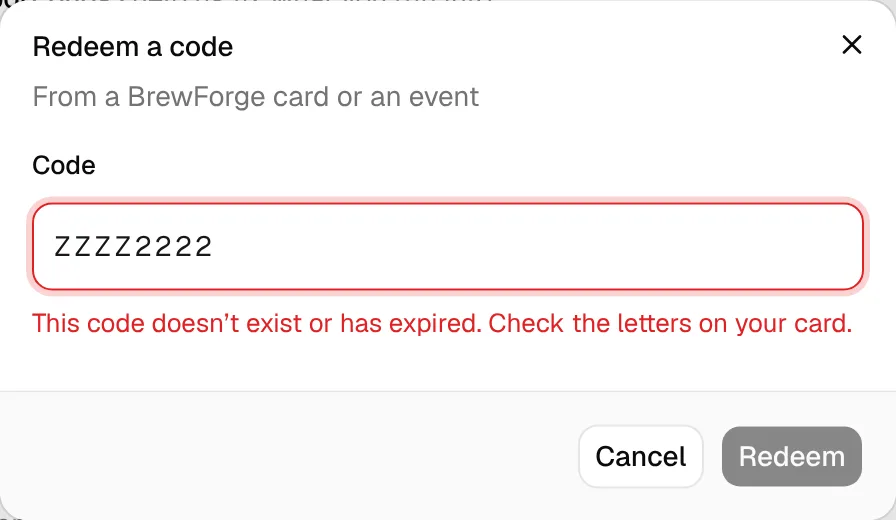
| Message | What it means |
|---|---|
| "This code doesn't exist or has expired." | A typo, or the code has expired, was switched off or has no uses left. Check the letters on your card. |
| "You already redeemed this code." | Every code works once per account. |
| "You already redeemed a code from this campaign. It's one per person." | Some codes belong to a campaign (for example one event). You can redeem one code per campaign. |
| "Too many tries. Wait a few minutes, then check the code again." | You can check up to 30 codes per 10 minutes. |
| "Something went wrong. Please try again." | The code was fine but redeeming failed. Click the button again. |
Codes from a link or QR code
A card can also link to brewforge.sh/redeem?code=…:
- Signed in: BrewForge opens the Bounty points page with the code already in the dialog and checks it right away.
- Not signed in: a page shows what the code is worth with Create a free account and I have an account · Sign in. The code is kept through sign-up or sign-in and waits in the dialog afterwards. If the code is invalid, the page says "This code doesn't work". Without a code in the link, the page asks for one (Check code).
- New account: if the welcome steps are still open after signing up, the page shows "You have a reward code to redeem: …" with a Redeem a code link instead of opening a second dialog.
You can also reach the dialog from the plans page: Have a bounty code? → Redeem a code.
Use your points
You don't redeem points by hand. When you have points and open the plans page (Use at checkout, or Subscription in the sidebar menu), the discount is shown there and applied automatically when you subscribe to Basic or Pro.
- One checkout uses at most 10 points (100%).
- Only the points you need are used. Bounty points stack with other discounts you have (a promotion or your Brewfather migration discount). The total is capped at 100%, and points only cover the part the other discounts leave open.
- The discount is for the first payment of the new subscription.
- Points are taken off when the subscription is created, also when it starts with a trial. The history shows the entry, for example "Used for 30% off Pro".
bounty share = min(points × 10 %, 100 % − other discounts)
points used = bounty share / 10 %, rounded up
Example: with a 50 % promotion and 8 points (80 %), the bounty share is min(80 %, 100 % − 50 %) = 50 %, so 5 points are used, the subscription is 100 % off, and 3 points stay on your balance.
Points don't expire, and they can't be paid out or moved to another account.
History
History lists every change to your balance, newest first (up to 50 entries): the points (+3, −10), what they were for and when.
- "Feedback: …" for points awarded on your feedback, with "awarded by …" when someone from the team gave them.
- "Referral: Anna subscribed to Pro" when a friend subscribed.
- "Redeemed code HK7T3NW2" for a reward code.
- "Used for 30% off Pro" when points went into a subscription.
Before anything has happened, the section says "Nothing yet. Points you earn and use show up here."
Related
- Plans and checkout: the plans page, discounts that add up with your points, and the checkout.
- Account: your plan and billing.
- Brewfather import: moving from Brewfather.