Open a recipe and brew it again
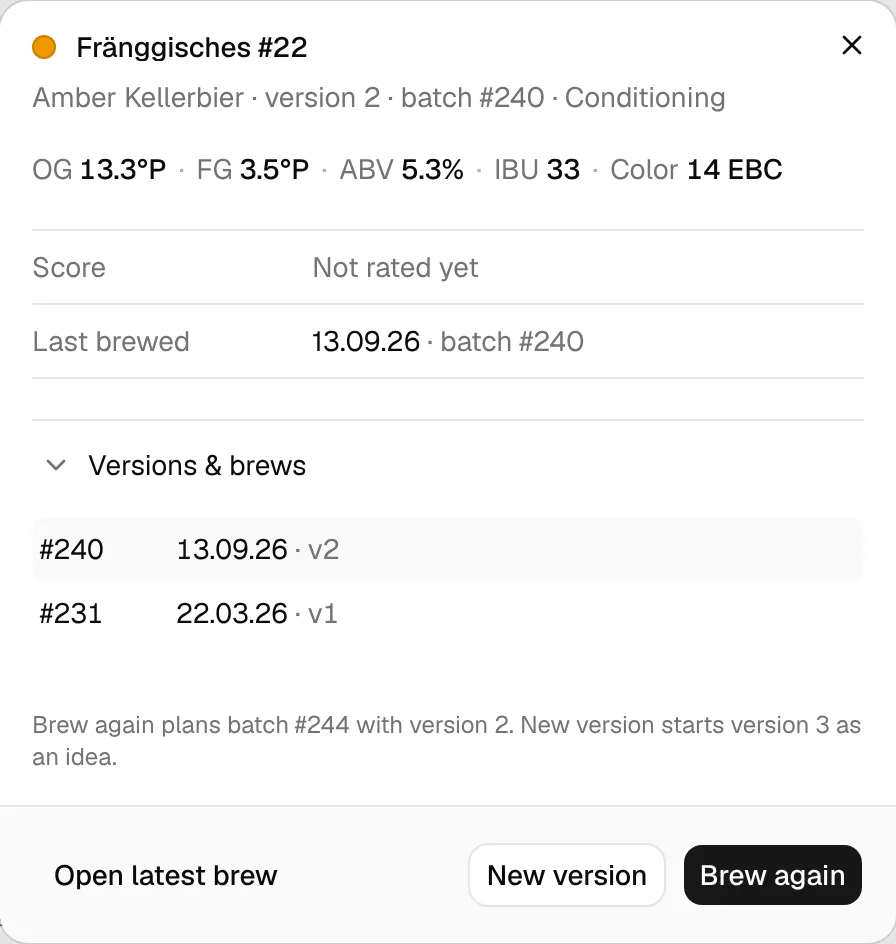
The recipe dialog in the BrewForge recipe book: key numbers, score, last brew, every version and brew of the recipe, and Brew again or New version to start the next batch.
Click a recipe in the recipe book to open its dialog. It shows the recipe at a glance and the three things you can do with it: open it, start a new version, or brew it again.
What the dialog shows
The dialog shows the latest version of the recipe.
- The title with the beer colour dot and the name. The line under it gives the style, the version, the batch number and the status of that brew.
- The description, when the brew has one.
- OG, FG, ABV, IBU, Color and Cost (the ingredient cost, when your ingredients have prices), in your units.
- Score: BJCP … / 50 with the number of score sheets of the newest version that has some, and Taste …/5, your taste rating of this brew. Not rated yet when there is neither.
- Last brewed: the latest brew date across all versions, with its batch number, or Not brewed yet.
- Folder & tags, when the recipe has any.
Versions & brews
The Versions & brews fold lists every brew of the recipe. Closed, it shows the count (for example 2 versions · 2 brews). Open, each line shows:
- the batch number (No batch for ideas without one),
- the brew date, or the status for brews not brewed yet,
- the version (
v2, orv2.1for a branch), - and its score: BJCP average or Taste rating.
The newest version comes first; within a version, the latest brew first. Click a line to open that brew.
Adopted from
For a recipe you adopted from a shared brew, the Adopted from fold shows the source and its brewer. Open, it lists every step of the recipe's history, latest source first, with the date you adopted it.
Open, brew again or start a new version
| Button | What it does |
|---|---|
| Open latest brew | Opens the brew the dialog shows: the latest version of the recipe. |
| Brew again | Copies the recipe exactly into a new brew with the status Planned and the next batch number. It stays the same version. Use it when you rebrew a recipe unchanged. |
| New version | Copies the recipe into a new brew with the next version number and the status Idea, without a batch number yet. Use it when you want to change the recipe and keep the old version for comparison. |
The line above the buttons says what you'll get, for example Brew again plans batch #244 with version 2. New version starts version 3 as an idea.
Brew again and New version take you straight to the new brew. It gets the recipe, equipment, water, style, description and tags of the brew the dialog shows. Measurements, brew log, ratings, tasting notes and dates are not copied, and the copy isn't shared. If BrewForge can't create the brew, the dialog says Couldn't create the brew. Nothing was changed, try again.
To start from an older version instead, open that brew from Versions & brews and use ⋯ → Duplicate Brew there (Brew again and new versions).
On the free plan, both buttons are off once all your brews are used. The dialog then says All N brews of the free plan are used. Delete a brew or see plans to brew this again. with a link to the plans.
Export and share
The recipe dialog has no export or share of its own. Open the brew and use Share or Export in its header for a share link, the recipe sheet PDF, BeerXML or JSON: see Share, export and versions.