Water profiles
Store your brewing water in BrewForge as water profiles: calcium, magnesium, sodium, chloride, sulfate and bicarbonate, read from a water report screenshot or typed in, with calculated SO4:Cl ratio, hardness, alkalinity, residual alkalinity and ion balance.
A water profile stores the mineral content of a water: your tap water from the water report, a bottled or RO water, or a classic brewing water like Pilsen or Burton-on-Trent. Recipes use water profiles as the starting point for water chemistry.
Open Settings → Profiles, switch to the Water tab and click a profile. The list shows the six ions in mg/L and the SO₄:Cl ratio. Classic waters such as Burton-on-Trent, Dublin, London, Munich and Pilsen are in Browse templates.
Create a water profile
Click New water profile and choose under Start from:
- New profile and type the values in yourself,
- Copy of… one of your profiles or a template, or
- Water report: upload or paste a screenshot of your supplier's water report. BrewForge reads the ions from it and you check the values before the profile is saved. You can read up to three reports per 24 hours.
The link Read the values from a screenshot under your list starts the water report right away.
The water page
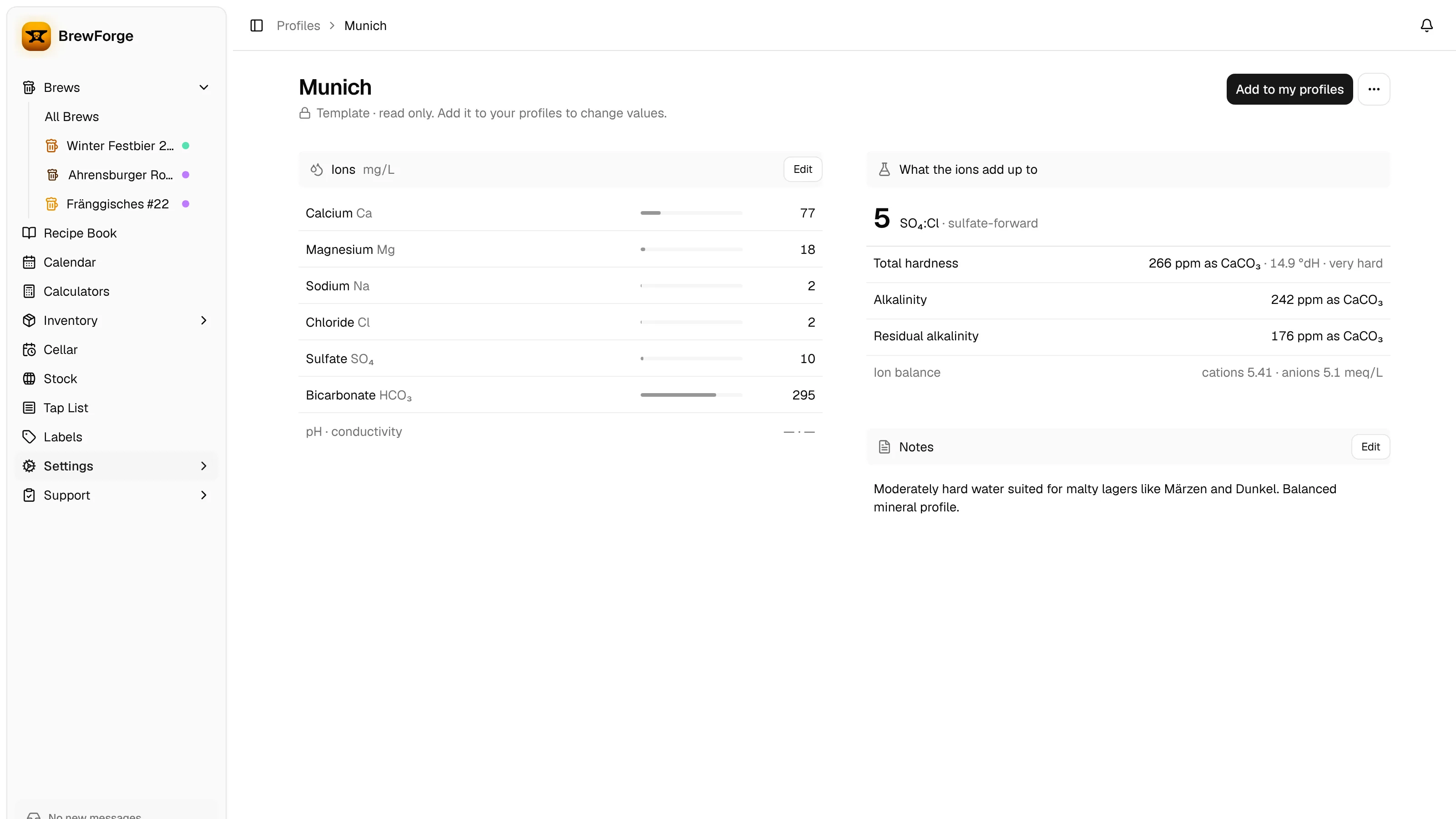
The Ions section lists Calcium, Magnesium, Sodium, Chloride, Sulfate and Bicarbonate in mg/L (ppm), plus pH · conductivity when you entered them. What the ions add up to shows the values BrewForge calculates from them. If the ion balance is off by more than 10 %, a line under the title says so: a value is probably missing or mistyped.
Ions
Click Edit in Ions (or a value) to change them. Copy the values from your water report. If it lists millimoles per liter, switch the Unit to mmol/L and enter those; BrewForge converts them and always stores mg/L. pH (between 3 and 11) and Conductivity (µS/cm) are optional.
mg/L = mmol/L × molar mass
Molar masses used: Ca 40.078, Mg 24.305, Na 22.990, Cl 35.453, SO₄ 96.06, HCO₃ 61.02 g/mol.
Example: 2.0 mmol/L calcium = 2.0 × 40.078 = 80.2 mg/L.
If your report only gives alkalinity as CaCO₃ instead of bicarbonate, convert it first: the formula below gives HCO₃ = alkalinity / 0.8202.
What the ions add up to
SO₄:Cl = sulfate / chloride, shown with one decimal and a description:
above 2 sulfate-forward, above 1 slightly sulfate-forward, above 0.5 balanced, above 0.33 slightly chloride-forward, otherwise chloride-forward. Without chloride the list shows SO₄ only (if there is sulfate) or No SO₄:Cl.
Example (Munich): 10 / 2 = 5, sulfate-forward.
total hardness (ppm as CaCO₃) = Ca × 2.497 + Mg × 4.116, also shown in German degrees: °dH = ppm as CaCO₃ / 17.848.
Described as soft (below 60), moderately hard (below 120), hard (below 180) or very hard.
alkalinity (ppm as CaCO₃) = HCO₃ × 0.8202
Example (Munich: Ca 77, Mg 18, HCO₃ 295): hardness 77 × 2.497 + 18 × 4.116 = 266 ppm = 14.9 °dH, very hard; alkalinity 295 × 0.8202 = 242 ppm.
residual alkalinity (ppm as CaCO₃) = alkalinity − Ca / 1.12 − Mg / 1.36
In mEq/L that is HCO₃ + CO₃ − Ca / 2.8 − Mg / 5.6 (after Troester), with the carbonate from the water's pH (7.0 if none is set). The mash pH estimate uses the same value, so both agree. The classic Kolbach formula (Ca / 1.4, Mg / 1.7) gives higher values for calcium-rich water.
Residual alkalinity tells you how much the water raises the mash pH: the higher, the better suited to dark beers.
Example (Munich): 242 − 77 / 1.12 − 18 / 1.36 = 160 ppm.
Each ion is converted to milliequivalents: meq/L = mg/L / equivalent weight, with Ca 20.04, Mg 12.15, Na 22.99, Cl 35.45, SO₄ 48.03 and HCO₃ 61.02.
cations = Ca + Mg + Na, anions = Cl + SO₄ + HCO₃ (in meq/L)
ion balance = (cations − anions) / max(cations, anions) × 100 %, rounded to whole percent. Up to ±10 % the analysis is plausible; beyond that the page asks you to check the values.
Example (Munich: Ca 77, Mg 18, Na 2, Cl 2, SO₄ 10, HCO₃ 295): cations 3.84 + 1.48 + 0.09 = 5.41 meq/L, anions 0.06 + 0.21 + 4.83 = 5.10 meq/L, balance (5.41 − 5.10) / 5.41 = +6 %.
Hardness, alkalinity and residual alkalinity are rounded to whole ppm, cations and anions to 0.01 meq/L.
Notes
Edit in Notes renames the profile and holds free text (up to 500 characters), for example the date of the water report.
Water profiles are copied into a recipe when you pick them as source water; changing the profile later doesn't change existing recipes.
The conductivity you store in a profile is used by the blend calculator in the recipe's water dialog.