Post a feature request or question
Start a thread in BrewForge Feedback, pick a username, check similar threads first, and see how the automatic check before publishing works.
Start a thread when BrewForge is missing something you need, or when you are stuck with a feature. Before you write, search the list: if your idea is already there, voting for it helps more than a second thread.
Open the form
Click New thread at the top of Feedback. On the Questions tab the form starts with Question selected.
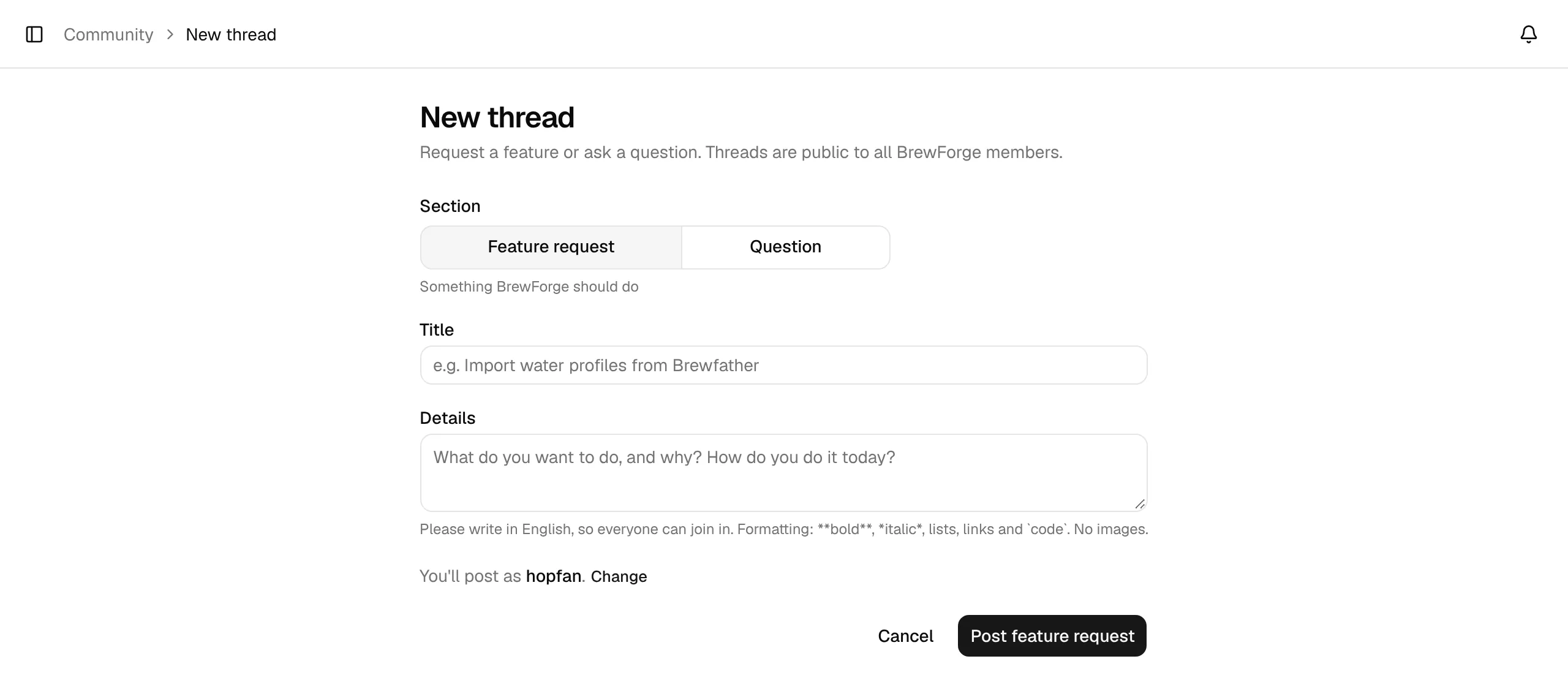
Pick the section
Under Section, choose Feature request (Something BrewForge should do) or Question (How do I … in BrewForge?).
Write a title and the details
The Title needs 8 to 140 characters. Under Details, describe what you want to do and why, and how you do it today (for a question: what you tried). Details can be up to 10,000 characters and use simple formatting: **bold**, *italic*, lists, links and `code`. Images aren't supported.
Please write in English, so everyone can join in.
Check the similar threads
From the fourth character of the title, BrewForge looks for Similar threads and lists them under the form. Open shows a thread; on a feature request that is still open for voting, Vote instead adds your vote right there (on Basic and Pro).
Post it
The line above the button says which name you post as. Click Post feature request or Post question.
Your username
Your posts show your username, never your email address or real name. Before your first post, the form asks for one under Username: 3–30 characters, letters, numbers, dots and underscores. Taken and reserved names are rejected. Later you change it with Change next to You'll post as …, or under Account → Community name. Members without a username show as Brewer # with a member number.
The check before publishing
Every new thread, reply and edit goes through an automatic check first. There are three outcomes:
| Outcome | What happens |
|---|---|
| Published | Your thread is live. Everyone sees it right away. |
| Pending review | The check wasn't sure, for example because the post looks off topic or the check is unavailable. A person from the team looks at it. Until then it shows Pending review and only you see it. |
| Not published | The post looks like insults, hate, sexual content, spam or advertising, or contains personal data such as an email address, phone number, postal address or API key. Only you see it, marked Not published with the reason. Edit it to try again. |
Off-topic posts are never rejected outright, only held for a person: loosely related brewing talk is fine.
Limits
On the free plan you can start 3 threads and write 10 replies per calendar month, on Basic, Pro or a trial 3 threads and 30 replies per day. New accounts can post once they are 7 days old. See Who can do what.