Subscribe to your calendar
Subscribe to your BrewForge brewing calendar as an ICS feed in Google Calendar, Apple Calendar, Outlook or any calendar app, and choose which brews and events it contains.
The calendar feed puts your brewing dates into the calendar app you already use, next to your other appointments. It is a private ICS link: your calendar app fetches it regularly, so new brews and changed dates show up there without you exporting anything.
Turn on the feed
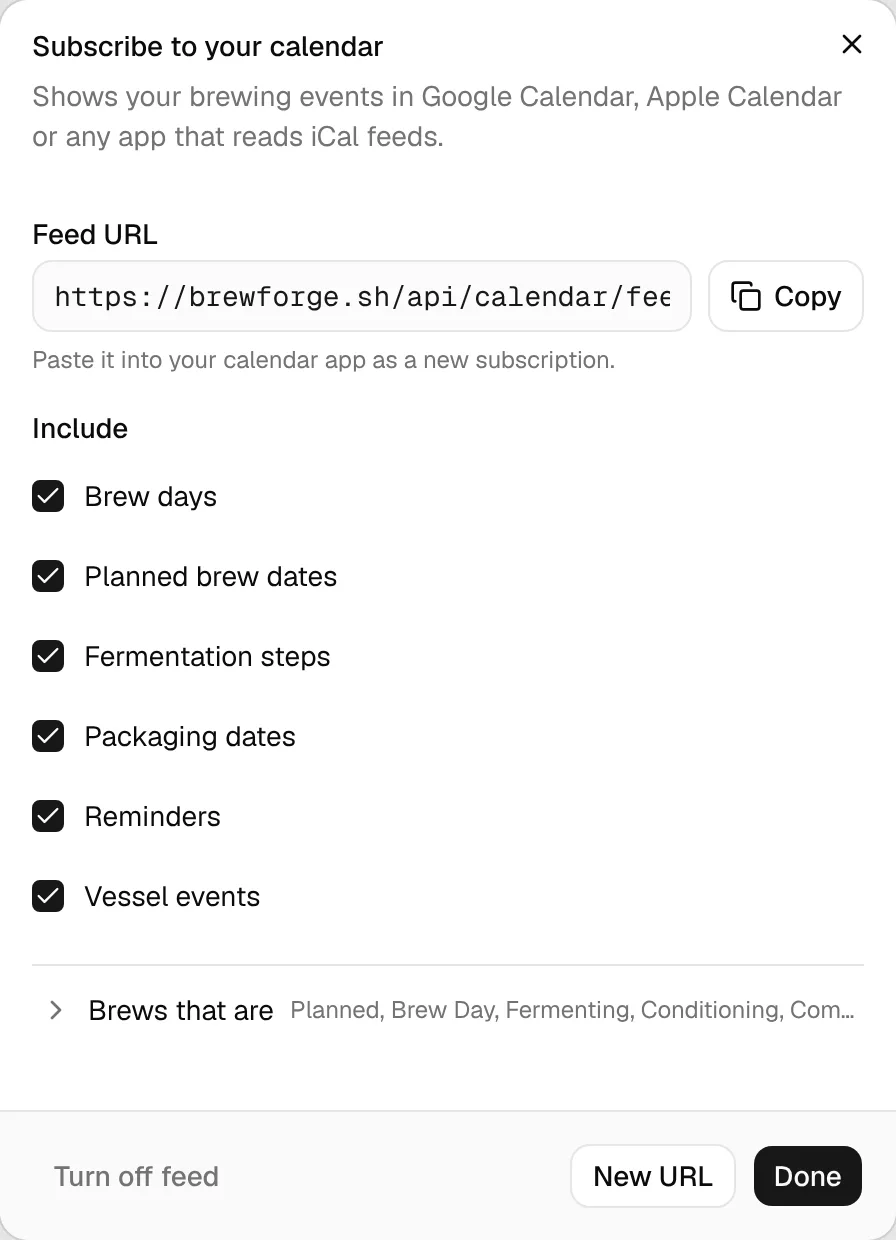
Open Calendar in the sidebar, click ⋯ at the top right and choose Subscribe to calendar.
Click Turn on feed. BrewForge creates your personal Feed URL.
Choose what the feed should contain (see Choose what the feed contains). You can change this later at any time.
Click Copy next to the URL and add it in your calendar app as a calendar from a URL (the menu is usually called "subscribe" or "add from URL"). Done closes the dialog.
Keep the URL private
Anyone with the feed URL can see your brewing dates, without logging in. Only paste it into your own calendar app. If it ever gets out, click New URL.
Choose what the feed contains
The feed has its own settings, separate from the Filter menu on the calendar page. Each change is saved right away and applies the next time your calendar app fetches the feed.
- Include: Brew days, Planned brew dates, Fermentation steps (stage starts, temperature changes, dry hops and other additions, fermentation complete, spunding), Packaging dates, Reminders (reminder notes from your brews' logs), Ready-by dates (a brew's ready-by date and its latest brew day) and Vessel events (when a vessel in your cellar is occupied and free again).
- Brews that are: brew events are only included for brews with a checked status. The folded line shows the checked statuses; click it to change them. All statuses except Archived are on by default.
The events are the same ones the calendar page shows.
What your calendar app shows
- The feed covers a rolling window from 90 days ago to 180 days ahead. Older and later events are left out.
- Events are all-day events. Spunding forecasts are the exception: they have a time and last 30 minutes.
- Titles start with the batch number and brew name, for example
#22 Fränggisches #22 Packaged: Fränggisches #22. Event titles in the feed are in English. - The event notes contain the brew name and details such as a stage's target temperature. Spunding and vessel events link back to BrewForge.
Your calendar app decides how often it fetches the feed, so a change in BrewForge can take a while to appear there.
New URL or turn the feed off
- New URL replaces the feed URL with a new one. BrewForge asks first (Make new URL). The old URL stops working, so update the subscription in your calendar app.
- Turn off feed turns the feed off after you confirm with Turn off, and the URL stops working. Turn on feed later gives you a new URL.